3D Workspace
Home
Assets
Affiliate Program
Creator Program
Sign up/Log in
View Plans
DCC Bridge
Anonymous1775406538
04-05 16:49
Model Name
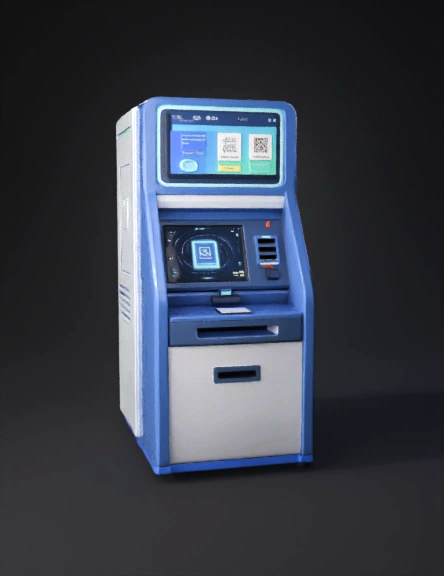
atm kiosk 3d model
Tags
atm kiosk
machine
machine realistic
machine rendering
machine rendering realistic
realistic
rendering
rendering realistic
scanner
Prompt
🎯 🔥 MAIN ATM KIOSK DESIGN PROMPT (Best One) Use this for professional mechanical + product design 👇 Futuristic ATM-style self-service print kiosk machine for university campus, sleek modern industrial design, touchscreen display, QR code scanner, document output tray, embedded high-speed printer, card payment terminal, LED indicator lights, minimal white and blue color theme, compact vertical structure, metal + glass body, ergonomic user interface, standing kiosk, high detail mechanical design, realistic rendering, 3D CAD style, front and side view, engineering product visualization, studio lighting, 4K resolution 🧠 VARIATIONS (Use for Different Designs) 1️⃣ Advanced AI Smart Kiosk (Your Patent Idea) ATM-style smart print kiosk with AI integration, QR code scanning system, cloud-connected printing, real-time display screen showing queue status, automatic paper selection trays (bond paper, emboss cover), robotic internal mechanism, futuristic UI, glowing LED strips, high-tech engineering design, exploded view showing internal components, mechanical CAD visualization, ultra-detailed 2️⃣ Internal Mechanical Design (Very Important 🔧) exploded view of ATM print kiosk internal mechanical system, printer module, paper rollers, stepper motors, QR scanner module, thermal + laser printer assembly, paper tray mechanism, detailed engineering diagram, labeled components, mechanical CAD drawing style, industrial design blueprint, white background, technical illustration 3️⃣ Simple College Project Model basic ATM-style print kiosk prototype, simple box design, touchscreen, QR scanner, paper output slot, low-cost student project model, plywood or plastic body, minimal design, engineering prototype, front view, clean background 4️⃣ UI + Screen Design Prompt ATM kiosk touchscreen interface for print system, QR scan screen, order status (queued, printing, completed), modern UI/UX design, clean layout, blue theme, student-friendly interface, buttons for print options, real-time queue display, futuristic dashboard "🔧 1. FULL INTERNAL MECHANICAL DESIGN PROMPT Use this to generate inside machine design (VERY IMPORTANT) exploded view of ATM-style print kiosk internal mechanical system, showing all components: high-speed laser printer module, paper feed rollers, stepper motors, gear mechanisms, conveyor rollers, paper trays (A4, bond paper, emboss cover), automatic paper selector system, document output tray, QR code scanner module, touchscreen control unit, metal frame structure, cable routing channels, detailed engineering CAD diagram, labeled parts, industrial mechanical design, white background, ultra-detailed, 4K ⚡ 2. ELECTRICAL + ELECTRONICS SYSTEM PROMPT electrical wiring diagram of smart ATM print kiosk, showing power supply unit, SMPS, motherboard, embedded computer (Raspberry Pi or mini PC), printer controller board, stepper motor drivers, sensors, QR scanner module, touchscreen display connections, thermal sensors, relay modules, cable management system, labeled circuit diagram, clean engineering schematic, professional electrical layout 🧠 3. COMPLETE ASSEMBLY DESIGN PROMPT assembly diagram of ATM print kiosk machine, step-by-step exploded assembly view, metal body frame, internal mounting brackets, printer installation, motor placement, wiring harness routing, QR scanner mounting, touchscreen panel fitting, paper tray alignment system, screws, bolts, connectors, engineering assembly guide, isometric view, mechanical CAD style ⚙️ 4. WORKING FLOW (SYSTEM OPERATION) PROMPT workflow diagram of smart ATM print kiosk system, user scans QR code, cloud authentication, order retrieval from database, print job processing, automatic paper selection, printing mechanism, output delivery tray, real-time status display, step-by-step process flowchart, modern UI style, technical diagram 🧩 5. ALL COMPONENTS LIST (FOR YOUR REPORT) Use this in your documentation 👇 🔹 Mechanical Parts Laser Printer Module (core) Paper Feed Rollers Stepper Motors (for paper movement) Gear Train System Multi Paper Tray System: A4 Tray Bond Paper Tray Emboss Cover Tray Output Tray (collection slot) Metal Frame / Cabinet Cooling Fans + Ventilation 🔹 Electrical Parts SMPS (Power Supply) Embedded Computer (Mini PC / Raspberry Pi) Motherboard / Controller Motor Drivers Relay Modules Sensors: Paper detection sensor Door open sensor Wiring Harness 🔹 Electronic Modules QR Code Scanner Touchscreen Display Payment System (optional) Network Module (WiFi/LAN) 🔄 6. WORKING (WRITE THIS IN YOUR PROJECT) Here’s a clean explanation you can use: 🟢 Step-by-Step Working: User scans QR code at kiosk System connects to cloud database (PrintEase) Order is verified (file + payment) Printer module receives command Paper type is selected automatically: Normal → A4 tray Capstone → emboss tray Motors move paper through rollers Printing is executed Output delivered to tray Status updated in system"
Detailed Info
Related Models
Enter invite code
Enter invite code to get credits!
 Anonymous1775406538


 Anonymous1775406538