3D Workspace
Home
Assets
Affiliate Program
Sign up/Log in
?
Upgrade
DCC Bridge
Anonymous1767155438
12-31 05:23
Model Name
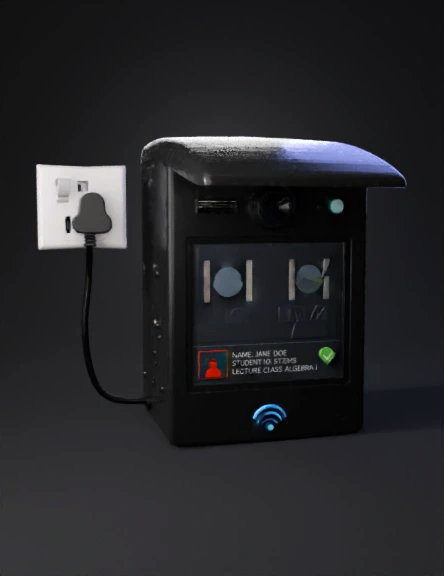
classroom attendance terminal 3d model
Tags
machine
machine realistic
machine rendering
machine rendering realistic
object
realistic
rendering
rendering realistic
Input
Prompt
1. Overall Object Description The object is a wall-mounted smart attendance / access terminal designed for classroom or lecture hall use. It has a rectangular vertical body with a protective top cover, an integrated camera–intercom–flashlight module, a central display screen, and RFID capability, powered by a direct electrical supply (plug-in). 2. Main Body Structure Shape: Tall rectangular box with slightly rounded edges Depth is moderate (not flat), allowing internal electronics Material (suggested): Matte plastic or painted metal housing Front surface is mostly flat Mounting: Designed to be wall-mounted Power cable exits from the side or rear and connects to a wall plug 3. Top Protective Cover A curved canopy-like cover is attached at the top Purpose: prevent direct sunlight and rain exposure Extends slightly forward beyond the front face Smooth, rounded profile Integrated seamlessly with the main body 4. Upper Module (Camera, Intercom, Flashlight) Located directly below the top cover, centered horizontally. 4.1 Rotating Camera System Positioned at the upper center Circular or oval camera lens Mounted on a rotating mechanism (pan or pan-tilt) Allows face capture from different angles Camera housing slightly protrudes from the front surface 4.2 Intercom Located in the middle, between the camera and flashlight Slim horizontal grille or slot Used for two-way audio communication Flush with the front panel 4.3 Flashlight / LED Light Positioned near the camera module Small circular or rectangular LED Used for illumination during low-light conditions 5. Display Screen Located at the center of the device, occupying most of the front face. 5.1 Screen Type Flat rectangular touchscreen Landscape orientation inside a vertical housing Slightly recessed or flush with the surface 5.2 On-Screen Content Layout Upper area of the screen: Live camera preview Face detection indicators (square or corner markers around faces) Bottom section of the screen: Student information panel displaying: Student Name Student ID Lecture Class Includes a confirmation indicator (e.g., green checkmark) 6. RFID / NRFID Indicator Located at the bottom front of the device Displays an NRFID (or RFID) logo or icon Indicates contactless card scanning area May include a subtle wireless signal icon No physical slot — tap-based interaction 7. Power System Primary energy source: Direct electrical power Uses a standard power supply line with plug Power cable: Visible from the side or rear Connects to a wall outlet No battery emphasized in the design
Detailed Info
Related Models
Enter invite code
Enter invite code to get credits!
 Anonymous1767155438


 Anonymous1767155438