3D Workspace
Home
Assets
Affiliate Program
Sign up/Log in
?
Upgrade
DCC Bridge
Anonymous1766239493
12-25 04:32
Model Name
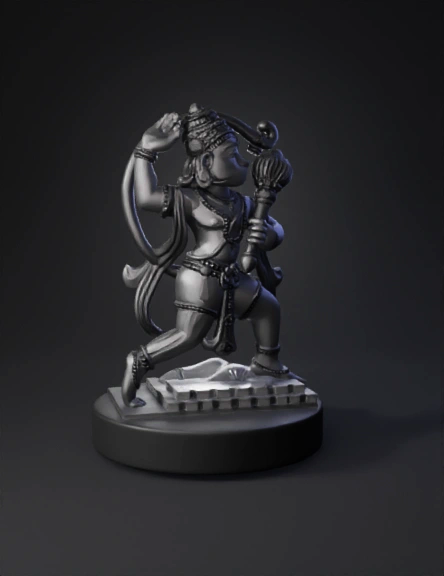
mythical deity statue 3d model
Tags
mythical deity statue
props
props realistic
props rendering
props rendering realistic
realistic
rendering
rendering realistic
Input
Prompt
1. Set the Correct Scale Final total height (including base): 50 mm In your 3D software: ZBrush: use Scale Master → set height to 50 mm Blender: set Units → Millimeters, model height = 50 2. Base Mesh Creation Start with simple human base meshes Keep anatomy slightly exaggerated: Thicker fingers Slightly larger facial features Stronger jewelry depth (This helps details survive printing at small scale) 3. Detail Sculpting (Miniature Rules) For 50 mm scale: Minimum detail depth: 0.3–0.4 mm Avoid very thin parts: Flute, ornaments, hands → thicken slightly Separate overlapping elements clearly: Hair, jewelry, clothing layers 4. Pose & Stability Ensure good balance Feet must connect firmly to base Add hidden supports where needed: Cloth touching legs Accessories touching body 5. Base Design Simple round or decorative base Base height: 3–5 mm Feet should be merged with base (no floating) 6. Mesh Cleanup No holes or non-manifold edges Use: ZBrush: Dynamesh → ZRemesh Blender: Merge by Distance Check normals and watertight mesh 7. Print Optimization Wall thickness: minimum 1 mm Separate parts if needed: Figures + base Export as STL Test print at 0.03–0.05 mm layer height 8. Final Check Before Export ✔ Height = 50 mm ✔ No thin or fragile parts ✔ Clean details visible when zoomed out ✔ Printable without extreme supports If you want, I can also help with: ZBrush step-by-step workflow Blender miniature sculpt settings Resin printer settings for 50 mm Fixing failed prints or weak parts
Detailed Info
Related Models
Enter invite code
Enter invite code to get credits!
 Anonymous1766239493


 Anonymous1766239493