3D Workspace
Home
Assets
Affiliate Program
Sign up/Log in
?
Upgrade
DCC Bridge
3D Creation Made Simple
Text & Image to 3D Model in seconds
One-Click Texturing & Smart Detail Editing
Free Credits Monthly
Start Free
Anonymous1755934617
01-06 08:29
Model Name
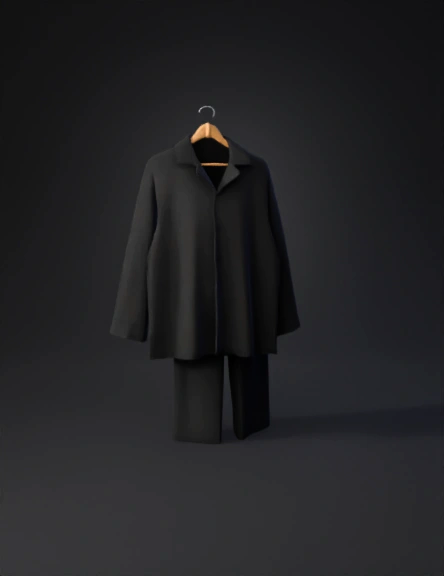
pajama set 3d model
Tags
clothing
rendering
realistic
Input
Prompt
1) Tripo Text-to-3D Prompt (Single Night Suit Set on Hanger) PROMPT (copy-paste): A realistic men’s two-piece night suit / pajama set hanging on a wooden hanger, premium minimal retail display. Includes: long-sleeve pajama shirt with notched lapel collar, front button placket (5 small buttons), relaxed fit, straight hem; and matching pajama pants with elastic waistband, straight legs. Cloth drape should look natural under gravity (soft wrinkles only: elbows, underarms, near hem, light folds on pants knees/thighs). Matte cotton / cotton poplin fabric (not satin), subtle fabric weave. Clean product asset: isolated object, no person, no mannequin, no background, no wall, no rack, no extra clothes. High-quality geometry, clean silhouette, realistic thickness, separate parts: shirt, pants, buttons, hanger. Color: solid jet black (matte). If you want a different color, replace the last line with: “Color: solid charcoal gray (matte).” “Color: solid dusty light blue (matte).” “Color: solid off-white / stone (matte).” (Do one at a time.) 2) Tripo Image-to-3D Prompt (Best for your reference image) Upload your reference image in Tripo and use this: PROMPT (copy-paste): Generate a realistic 3D model of ONE men’s pajama set inspired by the reference: a long-sleeve notched-lapel pajama shirt with front buttons and matching pajama pants, both hanging neatly on a wooden hanger. Keep it minimal and premium like a retail display. Matte cotton fabric with subtle weave, soft natural folds (not messy). Isolated object only — remove wall/background and remove other clothing sets — output only one pajama set + hanger. 3) Tripo Negative Prompt (Important) NEGATIVE PROMPT (copy-paste): no human, no mannequin, no body parts, no face, no hands, no wall, no rack, no closet, no background scene, no multiple outfits, no patterns, no logos, no embroidery, no text, no stripes, no checks, no satin, no silk shine, no leather, no zipper, no cargo pockets, no hood, no heavy wrinkles, no messy folds, no floating pieces, no intersecting meshes 4) Quick Tripo Tips (to get a cleaner model) Generate 1 set only. Don’t ask for 7 suits together — it often merges them. If Tripo gives “blobby cloth,” add this sentence to the prompt: “Sharp garment seams and clear collar shape; buttons must be distinct.” If pants come out weird, add: “Pants are straight-leg, elastic waist, no pleats, no pockets.” After generation, if Tripo offers “Refine / Enhance,” run it once (not multiple times). 5) Color Variants Workflow (Fastest) Generate one neutral model (light gray or off-white). Export to Blender/Substance (or use Tripo texture edit if available). Make material variants: black, navy, beige, blue, etc. This keeps geometry consistent.
Detailed Info
Related Models
Enter invite code
Enter invite code to get credits!