3D Workspace
Home
Assets
Affiliate Program
Creator Program
Sign up/Log in
?
Upgrade
DCC Bridge
Anonymous1780534764
06-04 01:19
Model Name
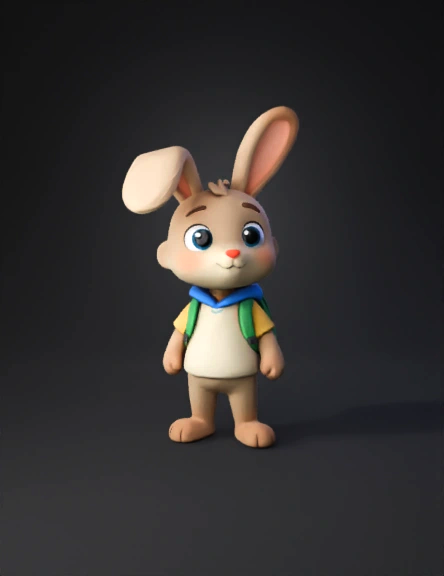
bundi rabbit 3d model
Tags
character
character game asset
character game asset stylized
character stylized
game asset
game asset stylized
stylized
Prompt
BODY SETTINGS: Slim body (small child-like proportions) Short height Soft shape (no sharp edges) 🟢 STEP 4 — FACE DESIGN (MAKE IT “BUNDI STYLE”) Adjust: 👀 Eyes: Big eyes (VERY IMPORTANT for kids animation) Slightly wide apart Bright expression 👃 Nose: Small soft nose 😊 Mouth: Small smile shape Neutral but friendly expression 🟢 STEP 5 — HAIR / EARS (IMPORTANT FOR RABBIT) Since Bundi is a rabbit: 👉 If rabbit ears are NOT available: choose short hair or simple head we will replace ears later in Blender OR add stylized rabbit head 👉 If ears available: long soft bunny ears slightly bent (not stiff) 🟢 STEP 6 — CLOTHING (SCHOOL LOOK) Choose: simple school shirt or hoodie backpack (if available) soft colors (blue, yellow, green) 👉 Rule: NO dark or complex clothing 🟢 STEP 7 — COLOR STYLE Pick: light brown / cream body tone soft pastel colors 👉 Avoid: black-heavy designs realistic skin textures 🟢 STEP 8 — NAME YOUR CHARACTER Name: 👉 “Bundi” Save avatar.
Detailed Info
Related Models
Enter invite code
Enter invite code to get credits!
 Anonymous1780534764


 Anonymous1780534764