3D Workspace
Home
Assets
Affiliate Program
Sign up/Log in
?
Upgrade
DCC Bridge
Anonymous1770307377
02-05 16:21
Model Name
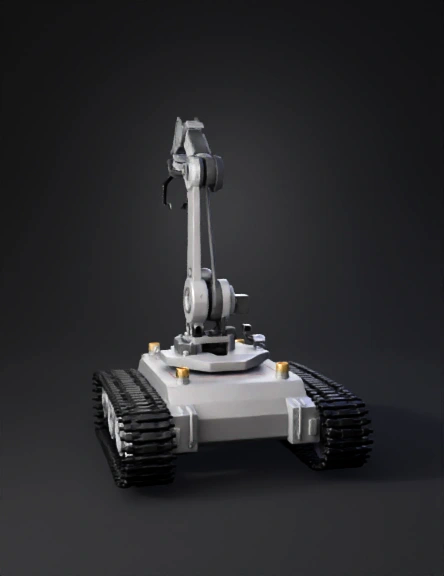
tank robot 3d model
Tags
realistic
simulation
simulation realistic
tank robot
vehicle
vehicle realistic
vehicle simulation
vehicle simulation realistic
Prompt
Act as a Fusion 360 mechanical design expert and robotics mentor. I want a COMPLETE, step-by-step Fusion 360 guide to design a TANK ROBOT WITH A ROBOTIC ARM AND CAMERA SYSTEM from scratch. Do NOT skip any step. Assume I am a beginner. Design requirements: - Robot type: Tank robot with robotic arm and vision system - Drive system: Rubber tank wheels with continuous track (medium size) - Wheels: Circular wheels clearly visible - Motors (drive): BO motors (66 × 26 × 25 mm) - Motor position: Bottom-mounted (under the base plate) - Base plate required Robotic arm requirements: - Arm type: 4-DOF robotic arm (base rotation, shoulder, elbow, gripper) - Arm mounting position: Center-top of the base plate - Arm actuation: Servo motors - Standard servo size: 40 × 20 × 40 mm - Arm base must support 360° rotation - Simple two-finger gripper - Proper joint alignment for motion simulation Camera / vision system requirements: - Camera type: Raspberry Pi Camera / USB Camera / ESP32-CAM (generic model) - Camera mounting options: - Option 1: Mounted on top of the robotic arm (near gripper) - Option 2: Mounted on a front mast (fixed vision) - Camera mount must: - Be adjustable (tilt angle) - Have screw holes - Avoid collision with arm and tank tracks - Camera field of view must face forward - Space for camera cable routing required Electronics & structure: - Battery holder required (12V or 2×18650 pack) - Controller mount required: - Arduino / Raspberry Pi - Motor driver (L298N / L293D) - Proper use of COMPONENTS (not only bodies) - Capture Design History must be ON - Design must support full 360° rotation (tank + arm + camera) - Final model must be shareable using a Fusion 360 Public Link (online viewer) The guide must include: PART A – INITIAL SETUP 1. Creating a new Fusion 360 design 2. Turning ON Capture Design History 3. Project units and grid setup PART B – TANK ROBOT 4. Creating the base plate with exact dimensions 5. Converting bodies into components correctly 6. Designing BO motors with exact dimensions 7. Placing motors at the bottom (left & right) 8. Creating motor shafts 9. Designing tank drive wheels 10. Aligning wheels with motor shafts 11. Creating idler wheels 12. Patterning wheels for tank layout 13. Designing a simple tank track (belt) using sweep PART C – ROBOTIC ARM 14. Creating the robotic arm rotating base 15. Designing servo motor housings 16. Designing shoulder link 17. Designing elbow link 18. Designing wrist and gripper mount 19. Designing a two-finger gripper 20. Adding revolute joints for arm motion 21. Checking arm movement clearance PART D – CAMERA SYSTEM 22. Designing camera housing 23. Designing adjustable camera mount 24. Mounting camera to arm or front mast 25. Adding tilt mechanism (hinge or servo space) 26. Providing cable routing channels 27. Ensuring camera field of view is unobstructed PART E – ELECTRONICS & MOUNTING 28. Designing battery holder 29. Designing controller mount with holes 30. Adding mounting holes to base plate 31. Adding space for wiring and airflow PART F – FINISHING & SHARING 32. Applying fillets for smooth edges 33. Applying materials (rubber, metal, plastic) 34. Checking full 360° rotation (tank + arm + camera) 35. Testing arm joints and camera alignment 36. Generating a Fusion 360 Public Share Link 37. Optional export steps (STL / STEP) Rules: - Use clear numbered steps - Use beginner-friendly language - Mention exact Fusion 360 menu paths (example: Solid → Create Sketch) - Do NOT jump steps - Do NOT assume prior knowledge - Explain common beginner mistakes and how to avoid them Final output must read like a complete beginner-to-finish tutorial for a tank robot with a robotic arm and camera-based vision system.
Detailed Info
Related Models
Enter invite code
Enter invite code to get credits!
 Anonymous1770307377


 Anonymous1770307377