3D Workspace
Home
Assets
Affiliate Program
Sign up/Log in
?
Upgrade
DCC Bridge
Anonymous1767608035
01-05 10:25
Model Name
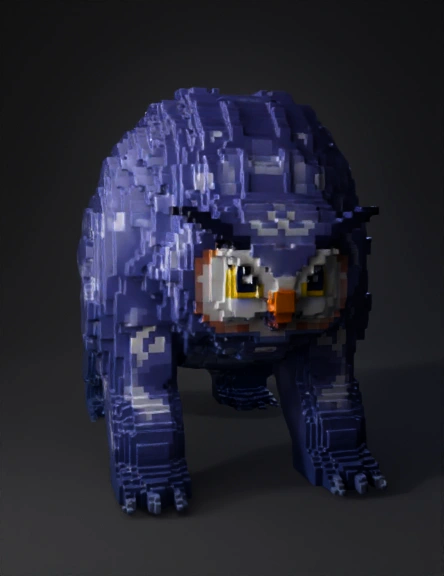
owlbear voxel model
Tags
creatures & animals
game asset
voxel
Input
Prompt
An owlbear from Dungeons and dragon, in block style for a block game Hytale Art Style "A modern, stylized voxel game, with retro pixel-art textures" Hytale art style was born of a combination of influences. By fully leveraging modern game engine capabilities while preserving the charm of our old-school pixel art, we are at the intersection of low-definition pixel art and hand-painted 3D. The Art Pillars We have distilled the essence of Hytale's style into what we call the Art Pillars. Every time we create something new, we ask ourselves: Is this compatible with our core visual Pillars? Immersive: We aspire to make our world feel alive, and for its digital nature to vanish. Art helps maintain the illusion of this lively world: There is motion and detail everywhere. Wind blows in the leaves. Creatures wander around. Clouds travel and let light pierce through. The world reacts to the player - creatures interact with them, their eyes express emotion and interest. We aspire that the game's visuals will leave a lasting impression on players' memories. Fantasy: Hytale is deeply Fantasy, but isn't limited to our core Medieval Fantasy world of Orbis. Our Art style remains recognizable and consistent across universes, stories, and themes. Each character we create has a unique personality and twist, even when we reuse popular archetypes. Stylized: This is visible through our proportions, color palette, and stylistic choices. Our models aim to be iconic and easily identifiable so players can read the world they navigate, regardless of how cluttered the space is. Simplicity is key; it doesn't mean low quality, and it takes many iterations to achieve. We carefully select which parts of the geometry to preserve and which to discard to achieve consistency. Flexible: Because our models are composed of primitive shapes like cubes and quads, it is also very easy to understand how they're made. When creating them, we keep the technical structure simple enough to be easy to comprehend, iterate on, and read, so our artists and users can make it theirs! Our tools are designed to be used and shared by everyone, and this is the true goal of Hytale: empowering user creativity. The Hytale Renderer The game wouldn't look as great without the technology bringing everything together. As described in the blog post about technical requirements, our engine is designed to run efficiently on older computers, prioritizing speed while also displaying an impressive number of elements at a satisfying view distance. We want our game to be playable by as many people as possible, so it will always be a matter of compromises between what's beautiful and what's performant. We aren't using the industry standard PBR workflows (roughness, normal maps, displacement, etc) - it is really tailored to elevate the art style in its unique way. We avoid applying effects that would damage the handcrafted texture style. The shading modes, shadowmap, SSAO, fog, and bloom we apply to our world are the cherry on top, making Hytale feel cozy and vibrant. Ultimately, even without any effects, our models should look good on their own. We paint lights and shadows inside textures and use real lights/shadows to bring everything together. We aren't using PBR workflows to create complex material effects; instead, we rely on in-house light propagation techniques. We apply a selective set of shaders and post-processing effects, such as Bloom, Depth of Field, and Ambient Occlusion. What's next for the rendering engine? Rendering deserves its own blog post. But it will continue to evolve significantly. In the future, we plan to address some visible light propagation issues and add colorimetry and gamma features, allowing us to gain more control over the color grading of the game. We are also exploring more flavorful features, such as godrays, transparent glass, and many other surprises! MAKING MODELS FOR HYTALE - GETTING STARTED! So… Now that you have had a glimpse of the theory, you are probably eager to know more about how to start making models. Well, let's dive in. Note: These are best practices; you don't have to follow them strictly. You are the masters of your own craft, and there is no good or bad way to create as long as you are having fun. Blockbench Plugin Download the latest Blockbench and the Hytale Blockbench plugin here. Source code for the plugin can be viewed here. To help you build models, we are releasing a Blockbench plugin tailored to our engine's needs. Please note that this plugin is also in early access, and you might encounter bugs. We will continue to make it more efficient and feature-complete soon. This plugin helps maintain a consistent pixel ratio across textures, enabling the export of models and animations in the correct format, along with other quality-of-life improvements detailed in the plugin patch notes. Our Geometry Constraints When making models, we only use 2 primitives: Cubes (6 sides) Quads (2 sides) No edge loops, no special topology, no triangles, pyramids, or other functions of more traditional modelling styles. This ensures all models are easy to make, unwrap, and animate, and don't require Weight Painting, rigging, or a 3D Art degree to get started. The Blockbench plugin will help you keep everything simple! The Hytale Proportions The character bodies are far from realistic. They are small, bulky, and cartoony. This supports the cartoony, chunky style used in every other element of the game. Similarly, blocks and furniture are "toylike" and have pure and iconic shapes. When creating characters, we carefully name each node to make it compatible with our animation system. As soon as the bones are properly named, they will be animated in-game.
Detailed Info
Related Models
Enter invite code
Enter invite code to get credits!