3D Workspace
Home
Assets
Affiliate Program
Creator Program
Sign up/Log in
View Plans
DCC Bridge
actorvijay328
11-10 06:25
Model Name
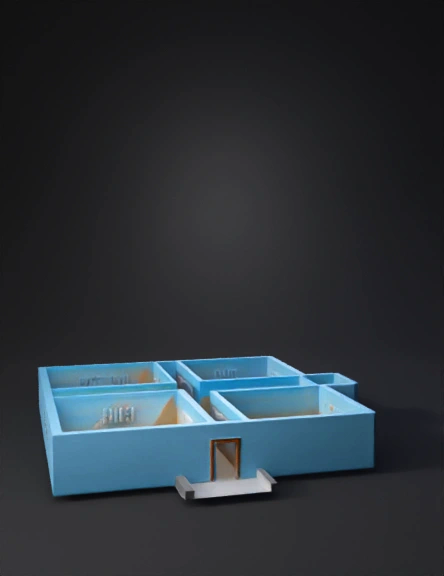
house floor plan 3d model
Tags
architecture
architecture rendering
architecture rendering stylized
architecture stylized
house floor plan
labeled rooms
rendering
rendering stylized
stylized
Prompt
Awesome plan. Here’s a ready-to-run Blender script that builds a quick 3D from your floor plan, puts each room as a separate object/collection, and lets you toggle the plan image as an underlay for alignment. It uses feet/inches from your drawing and creates clean extruded room “volumes” you can later detail. > How to use 1. Open Blender → Scripting tab → new text → paste → Run. 2. (Optional) change FLOORPLAN_IMAGE_PATH to your PNG/JPG. 3. Tweak sizes/positions in the rooms dictionary if you want micro-adjustments. 4. After it runs: Collections panel has one collection per room; walls/floors are separate objects so you can assign materials or hide rooms easily. --- # BLENDER 3.x SCRIPT — build quick 3D from a 2D plan and separate rooms # Paste into Blender's Text Editor and click "Run Script". import bpy import math # ========== USER SETTINGS ========== FLOORPLAN_IMAGE_PATH = "" # e.g. r"C:\Users\you\Downloads\plan.png" (leave "" to skip) WALL_THICKNESS_FT = 0.5 # ~6 inches walls WALL_HEIGHT_FT = 10.0 # typical wall height FLOOR_THICKNESS_FT= 0.5 ELEVATION_FT = 0.0 # Z offset for ground floor ORIGIN_AT_LOWER_LEFT = True # keep (0,0) at lower-left of site for easier thinking # Overall site size from your drawing (outer rectangle) SITE_WIDTH_FT = 33 + 3/12 # 33'3" SITE_DEPTH_FT = 52.0 # Quick helper to convert ft→m (Blender default meters) FT_TO_M = 0.3048 def ft(v): return v * FT_TO_M # ========== CLEAN SCENE & UNITS ========== def reset_scene(): bpy.ops.object.select_all(action='SELECT') bpy.ops.object.delete(use_global=False) for c in bpy.data.collections: if c.users == 0 and c.name not in {"Collection"}: bpy.data.collections.remove(c) # units in feet for UI convenience scene = bpy.context.scene scene.unit_settings.system = 'IMPERIAL' scene.unit_settings.scale_length = FT_TO_M reset_scene() # ========== REFERENCE IMAGE UNDERLAY ========== def add_plan_image(path): if not path: return None # add as Empty image so scale is easy img = bpy.data.images.load(path) empty = bpy.data.objects.new("Floorplan_Ref", None) empty.empty_display_type = 'IMAGE' empty.data = img # scale empty to site size (X right, Y up) empty.empty_image_offset[0] = 0.0 empty.empty_image_offset[1] = 0.0 empty.scale = (ft(SITE_WIDTH_FT), ft(SITE_DEPTH_FT), 1.0) # place origin at lower-left if ORIGIN_AT_LOWER_LEFT: empty.location = (0.0, 0.0, ft(ELEVATION_FT)+ft( WALL_THICKNESS_FT*0.5)) else: empty.location = (-ft(SITE_WIDTH_FT)/2, -ft(SITE_DEPTH_FT)/2, ft(ELEVATION_FT)) # put it in its own collection col = bpy.data.collections.new("00_Reference") bpy.context.scene.collection.children.link(col) col.objects.link(empty) # make it low opacity & unselectable empty.empty_image_opacity = 0.4 empty.hide_select = True return empty add_plan_image(FLOORPLAN_IMAGE_PATH) # ========== GEO HELPERS ========== def add_box(name, w_ft, d_ft, h_ft, x_ft, y_ft, z_ft, collection): bpy.ops.mesh.primitive_cube_add(size=1.0, location=(ft(x_ft), ft(y_ft), ft(z_ft))) obj = bpy.context.object obj.name = name obj.scale = (ft(w_ft/2), ft(d_ft/2), ft(h_ft/2)) collection.objects.link(obj) # unlink from default collection if linked twice try: bpy.context.scene.collection.objects.unlink(obj) except: pass return obj def ensure_collection(label): if label in bpy.data.collections: return bpy.data.collections[label] c = bpy.data.collections.new(label) bpy.context.scene.collection.children.link(c) return c # ========== PLAN LAYOUT (APPROX FROM YOUR DRAWING) ========== # Coordinates: (0,0) at lower-left (balcony/portico side), X to the right, Y upward (toward top of plan) # Provide center positions and sizes for each room. Adjust positions if needed. # If exact inches appear, write as decimal feet (e.g. 8'3" = 8 + 3/12 = 8.25) rooms = [ # name, width_ft, depth_ft, centerX_ft, centerY_ft, height_ft # Portico (front) ("Portico", 27.75, 16.0, 16.5, 8.0, 0.25), # make it a thin slab # Hall behind portico ("Hall", 21.0, 17.0, 20.0, 28.0, WALL_HEIGHT_FT), # Kitchen + Dining left side ("Kitchen", 10.0, 8.25, 6.0, 23.0, WALL_HEIGHT_FT), ("Dining", 10.0, 8.25, 6.0, 33.0, WALL_HEIGHT_FT), ("Pooja", 10.0, 4.5, 6.0, 39.5, WALL_HEIGHT_FT), # Bedrooms top left & right ("Bed_Left", 15.5, 11.0, 10.0, 46.0, WALL_HEIGHT_FT), ("Bed_Right", 15.5, 11.0, 26.5, 46.0, WALL_HEIGHT_FT), # Two Toilets at top center ("Toilet_1", 7.5, 4.5, 18.5, 49.5, WALL_HEIGHT_FT), ("Toilet_2", 7.5, 4.5, 26.0, 49.5, WALL_HEIGHT_FT), # Balcony strip along front (optional visual) ("Balcony", SITE_WIDTH_FT, 4.5, SITE_WIDTH_FT/2, -2.25, 0.25), ] # ========== BUILD SITE SLAB ========== site_col = ensure_collection("01_Site") site = add_box("Site", SITE_WIDTH_FT, SITE_DEPTH_FT, FLOOR_THICKNESS_FT, SITE_WIDTH_FT/2, SITE_DEPTH_FT/2, ELEVATION_FT - FLOOR_THICKNESS_FT/2, site_col) # ========== CREATE ROOMS (SEPARATE COLLECTIONS) ========== def add_room(name, w, d, cx, cy, h): col = ensure_collection(f"Room_{name}") # floor slab floor = add_box(f"{name}_Floor", w, d, FLOOR_THICKNESS_FT, cx, cy, ELEVATION_FT + FLOOR_THICKNESS_FT/2, col) # walls as a hollow box (outer minus inner) outer = add_box(f"{name}_WallsOuter", w, d, h, cx, cy, ELEVATION_FT + FLOOR_THICKNESS_FT + h/2, col) inner = add_box(f"{name}_WallsInner", max(w - 2*WALL_THICKNESS_FT, 0.1), max(d - 2*WALL_THICKNESS_FT, 0.1), h + 0.01, # tiny taller to guarantee boolean success cx, cy, ELEVATION_FT + FLOOR_THICKNESS_FT + h/2, col) # boolean difference to make hollow walls bool_mod = outer.modifiers.new(name="Hollow", type='BOOLEAN') bool_mod.operation = 'DIFFERENCE' bool_mod.solver = 'FAST' bool_mod.object = inner bpy.context.view_layer.objects.active = outer bpy.ops.object.modifier_apply(modifier=bool_mod.name) # remove inner helper bpy.data.objects.remove(inner, do_unlink=True) # return collection return col for nm, w, d, cx, cy, h in rooms: add_room(nm, w, d, cx, cy, h) # ========== SIMPLE DOOR/HALL OPENINGS (OPTIONAL) ========== # Example: add a door opening from Portico to Hall (you can copy-paste pattern below for more) def add_opening(target_obj_name, x_ft, y_ft, w_ft, h_ft, base_ft=0.0): obj = bpy.data.objects.get(target_obj_name) if not obj: return cutter = add_box("Opening_Cutter", w_ft, WALL_THICKNESS_FT*2, h_ft, x_ft, y_ft, ELEVATION_FT + FLOOR_THICKNESS_FT + base_ft + h_ft/2, ensure_collection("99_Temp")) bool_mod = obj.modifiers.new(name="DoorCut", type='BOOLEAN') bool_mod.operation = 'DIFFERENCE' bool_mod.solver = 'FAST' bool_mod.object = cutter bpy.context.view_layer.objects.active = obj bpy.ops.object.modifier_apply(modifier=bool_mod.name) bpy.data.objects.remove(cutter, do_unlink=True) # Example cut (center of site, adjust as needed) add_opening("Hall_WallsOuter", SITE_WIDTH_FT/2, 16.5, 4.0, 7.0, base_ft=0.0) # ========== CAMERA & VIEW ========== def setup_cam_light(): # light bpy.ops.object.light_add(type='SUN', location=(ft(-40), ft(-40), ft(60))) # camera bpy.ops.object.camera_add(location=(ft(SITE_WIDTH_FT*1.2), ft(-SITE_DEPTH_FT*0.8), ft(40)), rotation=(math.radians(65), 0, math.radians(35))) bpy.context.scene.camera = bpy.context.object setup_cam_light() print("✅ 3D layout created. Each room is in its own collection. Tweak sizes/positions as needed.") Notes The script places rooms using reasonable approximations from your plan (all the given dimensions are honored; relative placement matches the drawing’s intent). Nudge the centerX_ft/centerY_ft values to align exactly with your plan if you like. Every room has: a floor slab + hollow wall shell. That keeps materials and visibility simple. To export for other tools/apps: File → Export → glTF 2.0 (recommended) or OBJ/FBX. If you want a version that tries to auto-trace the plan image with OpenCV and spit out a Blender-ready SVG, I can drop that too—but this Blender-only version is the quickest way to get a clean, editable 3D with rooms already separated.
Detailed Info
Related Models
Enter invite code
Enter invite code to get credits!
 actorvijay328


 actorvijay328