3D Workspace
Home
Assets
Affiliate Program
Sign up/Log in
?
Upgrade
DCC Bridge
Anonymous1766607004
12-24 20:22
Model Name
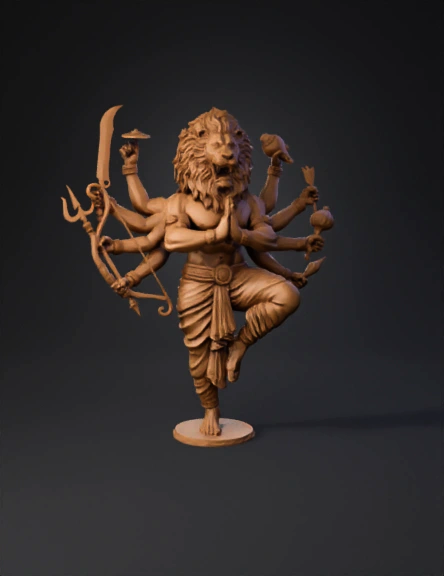
mythical lion statue 3d model
Tags
3d printing
3d printing realistic
creatures animals
creatures animals 3d printing
creatures animals 3d printing realistic
creatures animals realistic
narasimha
realistic
Input
Prompt
Below is a **ZBrush-specific, professional workflow** to create this **multi-armed Narasimha (lion-headed deity) 3D model**, written exactly the way **murti / idol / high-detail sculptors** work in ZBrush. --- ## **ZBRUSH WORKFLOW – NARASIMHA MULTI-ARM SCULPT** --- ## **1. Project Setup** * Open **ZBrush** * Set document scale (do not rely on zoom) * Import reference images into **SpotLight** * Enable: * **X symmetry** (for body & face) * Later use **Radial Symmetry** for arms --- ## **2. Blocking the Base Form (DynaMesh Stage)** **Tools Used:** `ZSphere / Base Human Mesh / DynaMesh` ### Steps: * Start with a **simple humanoid base** * Convert to **DynaMesh (low resolution)** * Block: * Torso * Legs (one raised, one grounded) * Tail (simple tube) * Create a rough **lion head block**: * Skull mass * Jaw volume * Eye sockets 🎯 *Focus only on proportions, not details* --- ## **3. Pose the Body** **Tools:** `Transpose Master / Gizmo 3D` * Pose before detailing * Bend: * Raised leg * Torso twist * Adjust balance so model can stand * Freeze pose using **TPoseMesh → TPose→SubT** ⚠️ Never detail before final pose --- ## **4. Sculpt Primary Anatomy** **Brushes Used:** * Move * Clay Buildup * DamStandard * Smooth ### Body: * Define: * Chest mass * Shoulder volume * Arm & leg muscle groups ### Lion Head: * Sculpt: * Brow ridge * Nose bridge * Jawline * Keep eyes deep and strong 🎯 Primary forms must read clearly in silhouette --- ## **5. Mane & Hair (Layered Workflow)** **Brushes:** * Clay Buildup * Move * DamStandard * SnakeHook (controlled) ### Process: 1. Block mane as **large flowing shapes** 2. Divide into mid-level clumps 3. Add fine hair grooves last ⚠️ Avoid thin hair – casting unsafe --- ## **6. Multi-Arm Creation (Radial Symmetry)** **Tools:** * Gizmo 3D * Array Mesh * Radial Symmetry (R) ### Steps: * Sculpt **one complete arm + hand** * Duplicate using **Radial Symmetry** * Adjust angles manually for natural flow * Merge arms to torso with DynaMesh --- ## **7. Hand Poses & Mudras** **Brushes:** * Move * Inflate * DamStandard * Sculpt: * Prayer hands at center * Weapon-holding hands * Maintain proper finger thickness * Slight bend in fingers for realism --- ## **8. Weapons & Accessories** **SubTools Created Separately** * Trident * Sword * Bow & Arrow * Chakra * Conch ### Process: * Block each weapon using: * ZModeler / DynaMesh * Merge to hands after placement * Thicken edges for printing safety --- ## **9. Clothing & Ornaments** **Brushes:** * Clay Buildup * Standard * DamStandard * Sculpt dhoti folds: * Primary folds first * Secondary creases later * Add: * Arm bands * Wrist cuffs * Waist belt * Use **Layers** for non-destructive detail --- ## **10. High-Detail Pass** **Subdivision Levels Added** * Subdivide gradually * Add: * Fur texture on face * Skin pores (very subtle) * Engraving on ornaments * Sharpen with **DamStandard** 🎯 Details must support form, not overpower it --- ## **11. Cleanup & Optimization** **Tools:** * ZRemesher (optional) * Decimation Master ### Steps: * Check: * Thin geometry * Floating parts * Merge all SubTools if required * Decimate while preserving detail --- ## **12. Final Export** * Export as: * **STL** → Printing / Casting * **OBJ** → Rendering * Test STL in slicer software --- ## **Professional Tips (Murti / Jewelry Work)** * Use **Polygroups** for arms & weapons * Avoid extreme undercuts * Keep minimum thickness: * Idol: **1.5–2 mm** * Jewelry: **0.6–0.8 mm** * Always test print small scale first --- If you want, I can also: ✔ Give **exact ZBrush brush settings** ✔ Convert this into **pendant / relief version** ✔ Share **client pricing & time estimate** ✔ Guide **from ZBrush to metal casting** Just tell me 👍
Detailed Info
Related Models
Enter invite code
Enter invite code to get credits!
 Anonymous1766607004


 Anonymous1766607004