3D Workspace
Home
Assets
Affiliate Program
Creator Program
Sign up/Log in
View Plans
DCC Bridge
2387944522
10-16 20:03
Model Name
heavy truck 3d model
Tags
camioneta
heavy truck
realistic
rendering
rendering realistic
semi trailer
tractor trailer
vehicle
vehicle realistic
vehicle rendering
vehicle rendering realistic
Prompt
import requests import json import time # 1. 配置Tripo AI API密钥(需在官网https://platform.tripo3d.ai/api-keys生成) api_key = "你的API密钥" headers = { "Content-Type": "application/json", "Authorization": f"Bearer {api_key}" } # 2. 上传图片并启动1:1建模任务 def start_1to1_modeling(image_path, model_name="乘龙H7卡车"): url = "https://api.tripo3d.ai/v2/openaip/task" data = { "type": "image_to_model", "image_path": image_path, # 本地图片路径,需提前准备乘龙H7的高清细节图 "params": { "detail": "ultra", # 超细节模式(需Tripo 3.0及以上版本支持) "scale": 1.0, # 强制1:1比例还原 "texture": "pbr", # 启用物理材质渲染 "model_name": model_name } } response = requests.post(url, headers=headers, data=json.dumps(data)) result = response.json() if result["code"] == 0: return result["data"]["task_id"] else: raise Exception(f"建模任务启动失败:{result['message']}") # 3. 查询任务状态并获取模型下载链接 def get_model_result(task_id): url = f"https://api.tripo3d.ai/v2/openaip/task/{task_id}" while True: response = requests.get(url, headers=headers) result = response.json() if result["data"]["status"] == "completed": return result["data"]["model_url"] # 返回GLB/OBJ格式的1:1模型链接 elif result["data"]["status"] == "failed": raise Exception(f"建模任务失败:{result['data']['message']}") time.sleep(5) # 每5秒查询一次 # 4. 执行流程 if __name__ == "__main__": image_path = "本地乘龙H7高清细节图.jpg" # 替换为实际图片路径 task_id = start_1to1_modeling(image_path) model_url = get_model_result(task_id) print(f"1:1还原模型已生成,下载地址:{model_url}")
Detailed Info
Related Models
Enter invite code
Enter invite code to get credits!
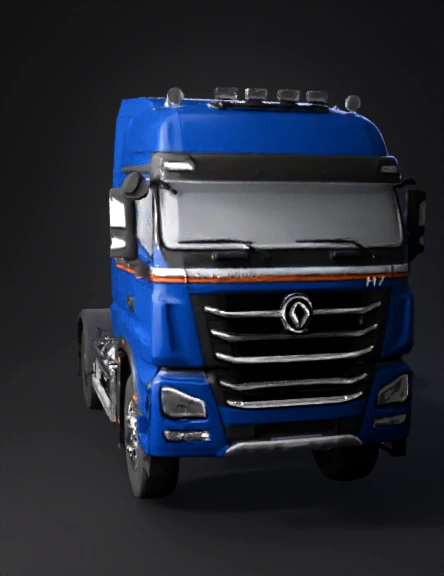
 2387944522


 2387944522