3D Workspace
Home
Assets
Affiliate Program
Sign up/Log in
?
Upgrade
DCC Bridge
Anonymous1764656619
12-02 07:53
Model Name
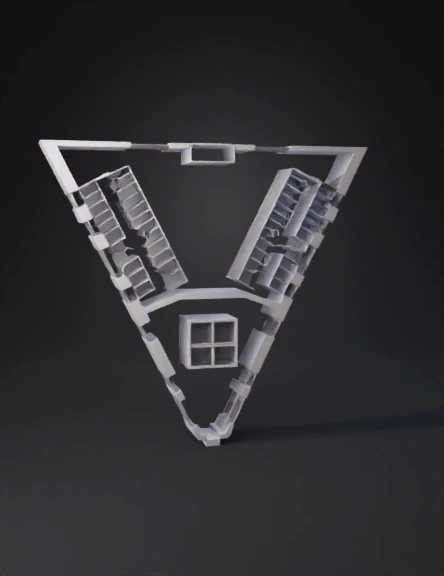
triangular floor plan 3d model
Tags
architecture
rendering
realistic
Prompt
“Create a clean, minimalist 3D architectural floor plan rendered from a perfectly top‑down, orthographic camera view. The building has a single, roughly triangular floor plate with the point of the triangle facing downwards and the wide base at the top. The top edge is almost horizontal and slightly indented at the middle. The two sides angle down symmetrically toward a narrow, faceted point at the bottom, giving the overall shape a stylized shield or arrowhead look. Colors and style: - Floor surface: flat, uniform light cream or off‑white with no texture. - All structural and partition walls: medium to dark neutral gray. - Background: pure white or very light gray, no surrounding environment. - No furniture, people, or labels; only walls and room outlines. - Soft, even lighting, minimal shadows, diagrammatic 3D. Internal layout (overall structure): - The interior is divided into three main zones: a left wing, a right wing, and a central block near the middle/lower part of the triangle. - At the very top, along the straight upper edge, there is a thin horizontal gray strip of wall, slightly inset from the outer boundary, suggesting an outer wall band. - From that upper band, two large diagonal wings extend downward: one to the left, one to the right. Each wing is a long, tapering polygonal bar running diagonally toward the center, forming a V‑shape. Left diagonal wing: - Starting near the top center, a thick gray wall runs diagonally downwards toward the lower left, forming the outer edge of the left wing. - Inside this wing, a row of small, regularly spaced rectangular rooms is arranged in a strip along its length, like compartments in a train car. - Each small room is drawn in a slightly lighter cream tone, outlined by thin gray walls, and many of them contain a light X‑shaped mark or cross to indicate internal structure. - The inner edge of the left wing meets a diagonal corridor line that slopes down and inward toward the center. Right diagonal wing: - Mirroring the left, a similar thick gray wall runs diagonally downward from near the upper center toward the lower right, forming the outer edge of the right wing. - Inside this right wing, create another row of small, evenly spaced rectangular rooms, also with light cream fill and X‑marks. - The inner edge of this wing also meets a diagonal line that slopes inward toward the center, creating a symmetrical V‑shape with the left wing. Central band and core: - Where the two diagonal wings converge, add a strong, slightly curved or angled horizontal band of gray wall stretching across the floor from left to right, roughly in the middle of the shape. This band separates the upper wings from a central lower zone. - Below this band, in the central area, create a compact block of several square or nearly square rooms arranged in a grid of around 2 by 2 or 3 by 2. These central rooms have the same light cream interior and subtle X‑marks. - Surround these central rooms with thicker gray perimeter walls, making this block stand out as a core or service zone. Lower triangular portion: - Below the central core block, the floor plate narrows into a pointed, faceted triangle. Keep this lower portion mostly open, with light cream floor and only a few short gray wall segments along the edges near the bottom, suggesting structural boundaries but not subdividing it heavily. - The bottom tip is sharp or slightly truncated, with a narrow horizontal edge. Rendering instructions: - Emphasize crisp, straight edges and polygonal geometry. - Ensure perfect symmetry between left and right wings in angle and general proportion, while allowing minor room size variations. - Keep the drawing extremely clean and technical: cream background floor, clearly visible gray diagonal wings full of small rooms with X‑marks, a horizontal middle band, a dense rectangular core block below it, and a simple, pointed lower extension — all viewed from directly above as a 3D floor‑plan model.
Detailed Info
Related Models
Enter invite code
Enter invite code to get credits!