3D Workspace
Home
Assets
Affiliate Program
Creator Program
Sign up/Log in
View Plans
DCC Bridge
Anonymous1769675783
01-29 08:55
Model Name
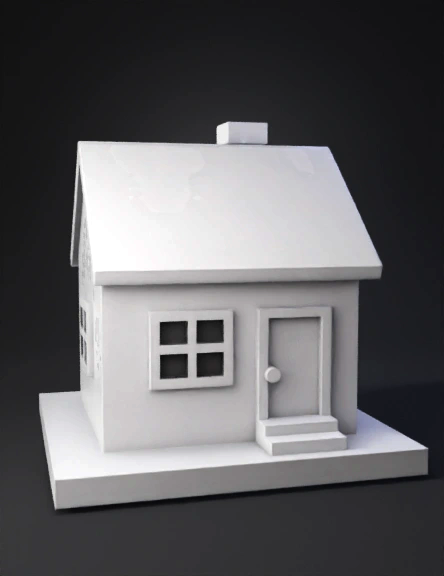
low poly house 3d model
Tags
architecture
architecture game asset
architecture game asset stylized
architecture stylized
game asset
game asset stylized
low poly house
stylized
Prompt
Create a clean, simple, low-poly 3D house model in a soft, minimal, cartoon-like style. The model should look like a beginner-friendly game asset made for Unity, Unreal Engine, or Blender. The entire house must be built only from basic geometric shapes such as cubes, rectangular prisms, and planes, with no complex curves, no rounded edges, and no high-detail surfaces. The polygon count must be low, keeping everything optimized, simple, and lightweight. The model should be untextured and uncolored, using only the default white or light grey material, with smooth shading and no image textures, no roughness maps, no normal maps, and no surface noise. Everything should appear clean, soft, and plastic-like, similar to a clay model or a low-poly tutorial example. The house should stand on a small, square or slightly rectangular base platform. This base should be a flat block that is a little wider than the house itself, creating a border around it. The base should be slightly raised from the ground, forming a simple foundation. At the front center of this base, add two small rectangular steps leading up to the main door. These steps should be blocky, symmetrical, and aligned perfectly with the center of the house. Each step should be a simple extruded cube with sharp edges and no bevels. On top of the base, place the main building body. The building should be a single-floor rectangular box, with smooth flat walls and consistent thickness. The proportions should look like a small family house or a simple village house in a game. The walls must be straight and clean, with no bricks, no cracks, no patterns, and no realistic details. The edges can be slightly beveled or kept sharp, but still simple and low-poly. The front wall should be perfectly flat except for the door and windows. The roof should be a classic gable roof shape. It must have two equal sloping sides that meet at a straight ridge in the middle. The roof should slightly overhang the walls on all sides, especially at the front and back. The thickness of the roof should be visible, making it look like a solid object, not just a thin plane. The roof should be a single clean mesh with simple geometry, no tiles, no texture patterns, and no realistic surface details. The roof edges should be straight and sharp, giving a neat, stylized look. On the right side of the roof, add a small rectangular chimney. The chimney should be a simple vertical box, slightly taller than the roof surface. On top of the chimney, place a smaller rectangular cap, also block-shaped, giving the impression of a chimney top. The chimney should be aligned cleanly and symmetrically with the roof surface, with no bending, no pipes, and no smoke. It must remain low-poly and simple, matching the style of the house. The front of the house should have one main door placed exactly in the center. The door should be a vertical rectangle, slightly inset or slightly extruded from the wall. Add a simple small round or cylindrical knob on the right side of the door. The knob should be a very simple low-poly shape, not detailed, just enough to show it is a handle. The door frame should be a slightly raised border around the door, created by a thin rectangular extrusion. On each side of the door, place one square window. The windows should be symmetrical, one on the left and one on the right, aligned at the same height. Each window should be divided into four equal square panes using a simple cross shape. The window frame should be slightly extruded outward from the wall, and the inner glass area should be slightly recessed. The window bars should be simple rectangular shapes, not thin realistic metal, just clean block geometry. No transparency or glass material is needed; keep everything in the same default white or grey material. The sides of the house should be plain, with no extra details, no doors, and no windows unless necessary. The back of the house can be simple and flat. The overall proportions should feel balanced, cute, and slightly stylized, not realistic architecture, but more like a low-poly game asset or an animation prop. All objects should be cleanly separated or neatly joined, with proper alignment and no floating parts. The house, roof, chimney, steps, door, windows, and base should all be properly scaled relative to each other. The house should not look too tall or too flat; it should have a cozy, compact look. The lighting should be simple studio lighting, coming slightly from the top left or top front, creating soft shadows under the roof overhang, around the window frames, under the steps, and near the base edges. The shadows should be smooth and not harsh. The background should be a plain dark grey or neutral gradient, with no environment, no sky, no ground texture, and no extra objects. The focus must remain entirely on the house model. The camera should be placed at a three-quarter front angle, slightly above eye level, so that the front wall, the right side wall, the roof, the chimney, the door, the windows, and the steps are all clearly visible. The camera should not be too close and not too far, giving a clear view of the full house in one frame. The perspective should be natural and slightly isometric-like, suitable for showcasing a low-poly asset. The final result should look like a tutorial example of “Low Poly House Modeling in Blender,” with clean topology, simple shapes, and a friendly, minimal style. It should feel like something made for learning, games, or animation, not for photorealism. No colors, no textures, no complex materials, only smooth white or light grey shading. The overall look must be simple, cute, clean, and perfectly suitable as a low-poly 3D house asset.The back wall of the house also has two square windows, same style as the front ones, evenly spaced, four-pane cross design, slightly extruded frames, low-poly, untextured, and perfectly aligned. Modeling a low poly house | Blender 5.0.1 Tutorial dont colour liike this
Detailed Info
Related Models
Enter invite code
Enter invite code to get credits!
 Anonymous1769675783


 Anonymous1769675783