3D Workspace
Home
Assets
Affiliate Program
Sign up/Log in
?
Upgrade
DCC Bridge
Anonymous1763922886
11-23 19:58
Model Name
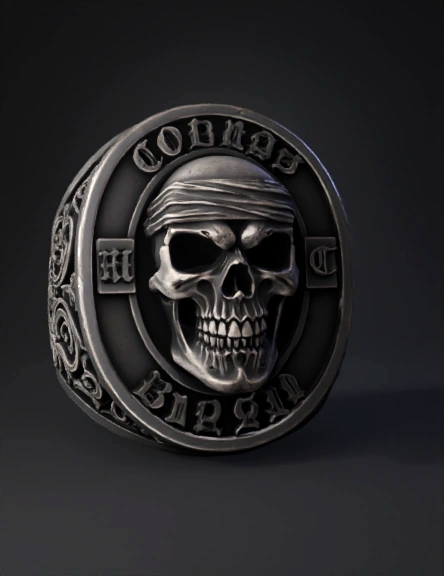
ornate coin 3d model
Tags
props
rendering
realistic
Input
Prompt
Create a heavy, dark antique metal ring in ZBrush, with an oval top and thick band. The overall style should be gothic, aggressive, and highly detailed. Sculpting Instructions (ZBrush): Sculpt a human skull in high relief at the center of the ring. The skull must have deep eye sockets, sharp teeth, and an intense expression. Add a bandana wrapped around the head, with realistic folds and fabric texture. Surround the skull with a thick oval frame in aged metal. On the top of the oval frame, sculpt the word “COBRAS” in heavy gothic lettering, raised and with sharp edges. On the bottom of the oval frame, sculpt the word “BRASIL”, also in heavy gothic lettering, matching the style, thickness, and relief of the top text. On the left side inside the oval frame, sculpt the gothic letter “M” inside a small rectangular metal plate. On the right side, sculpt the gothic letter “C” in the same format. On both sides of the ring band, add gothic ornamental patterns: medieval scrolls, curved motifs, and symmetrical flourishes, all in deep relief. Apply aged metal surface detail: micro-scratches, oxidation pits, worn edges, and variation between polished and matte areas. Keep the ring bulky and heavy, with deep relief everywhere for strong shadows and a solid biker/medieval aesthetic.
Detailed Info
Related Models
Enter invite code
Enter invite code to get credits!