3D Workspace
Home
Assets
Affiliate Program
Creator Program
Sign up/Log in
View Plans
DCC Bridge
ealss1731
01-07 14:02
Model Name
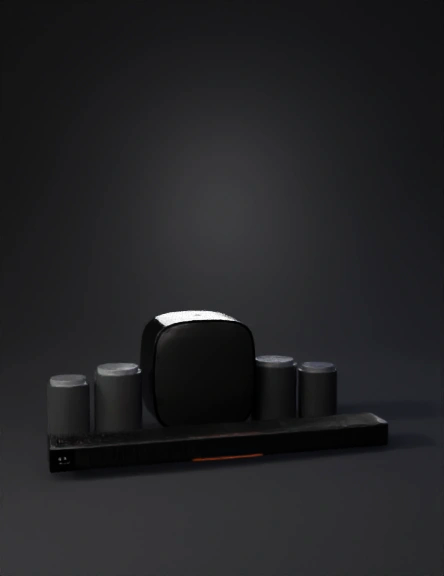
premium home audio 3d model
Tags
machine
machine realistic
machine rendering
machine rendering realistic
realistic
rendering
rendering realistic
soundbar
Input
Prompt
Create a high-quality, realistic 3D model of a premium home audio system based on the reference image. The system consists of one soundbar, one subwoofer, and five compact satellite speakers. 1. Overall Style & Accuracy Modern, minimalist, premium consumer electronics design Matte black main body with subtle satin finish Precise proportions matching the reference image Clean industrial design with soft edges and rounded corners Realistic scale suitable for living room placement 2. Soundbar Long, slim rectangular form Slightly rounded edges and corners Front face covered with fine perforated speaker grille texture Top surface includes subtle control buttons (power, volume, input) Small, discreet brand mark on the right side Thin orange LED accent line along the bottom front edge No visible screws on the exterior 3. Subwoofer Tall, rounded-rectangle cube shape Softly curved edges with a fabric-covered front panel Top surface: smooth matte plastic with a small circular LED indicator Rear panel (optional): power port, signal input, ventilation slots Fabric texture should appear dense and slightly rough, not glossy 4. Satellite Speakers (5 units) Compact cylindrical shape with flat top and bottom Top surface: brushed metal disc texture with subtle radial pattern Body: matte black plastic Thin orange LED ring near the bottom edge Minimal seams, clean silhouette Identical proportions for all five units 5. Materials & Textures Use PBR materials (Metalness/Roughness workflow) Matte plastic: low reflectivity, soft highlights Brushed metal: subtle anisotropic reflection on speaker tops Fabric grille: realistic woven texture with micro detail LED elements: emissive material with soft glow (orange) 6. Modeling Requirements Clean quad-based topology Bevel all sharp edges slightly for realism Separate meshes for body, grille, LED, and top caps Correct smoothing groups applied Real-world scale (centimeters) 7. Rendering & Lighting (optional setup) Studio lighting setup (soft key light, fill light, rim light) Neutral gray or white background Subtle ground shadow Physically correct reflections and shadows 8. File Output Native 3ds Max (.max) file Organized layers and named objects Ready for close-up product rendering and animation
Detailed Info
Related Models
Enter invite code
Enter invite code to get credits!
 ealss1731


 ealss1731