3D Workspace
Home
Assets
Affiliate Program
Creator Program
Sign up/Log in
View Plans
DCC Bridge
nelsonvictordaluz
03-23 18:21
Model Name
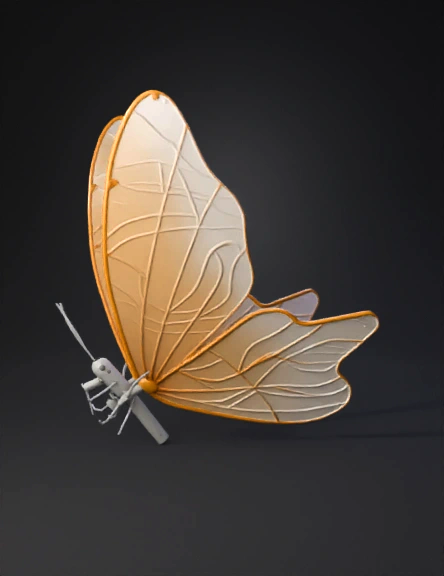
butterfly 3d model
Tags
butterfly
creatures animals
creatures animals realistic
creatures animals rendering
creatures animals rendering realistic
realistic
rendering
rendering realistic
Input
Prompt
Create a highly detailed 3D model based strictly on the provided butterfly image. Preserve 100% of the original design, proportions, silhouette, and wing shapes — no reinterpretation, no stylization changes. The butterfly must have: - Thin, semi-translucent wings with a warm golden-beige tone - Subtle internal veining exactly matching the reference - Fine glitter-like speckles embedded inside the wings (not surface noise) - Smooth gradient transparency across the wings - Slight reflective shimmer, but physically plausible (no exaggerated glow) Material setup: - Wings: translucent material (SSS or thin glass-like shader), soft light scattering, very subtle roughness - Veins: slightly more opaque and defined - Body: matte light gray/white, minimalistic, smooth surface - Antennae: thin, slightly curved, delicate Geometry: - Ultra-thin wing thickness (almost plane-like, but with micro thickness for realism) - Clean topology suitable for rendering (no noise, no artifacts) - High-resolution mesh for close-up rendering Lighting (for preview render): - Soft studio lighting (HDRI neutral) - Clean white or very light gray background - Gentle reflections to enhance material quality Rendering style: - Photorealistic - No cartoon, no stylization - No deformation or exaggeration Technical output: - Centered pivot - Proper scale (real-world butterfly size) - Export-ready (OBJ / FBX / GLB) Important: Do not add extra elements, do not change colors, do not modify proportions, do not invent missing details. Faithful reconstruction only.
Detailed Info
Related Models
Enter invite code
Enter invite code to get credits!
 nelsonvictordaluz


 nelsonvictordaluz