3D Workspace
Home
Assets
Affiliate Program
Sign up/Log in
?
Upgrade
DCC Bridge
Anonymous1763488499
11-18 17:58
Model Name
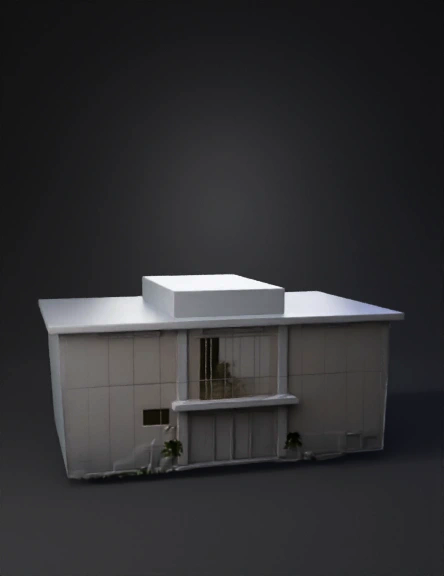
rehabilitation center 3d model
Tags
animation
animation realistic
architecture
architecture animation
architecture animation realistic
architecture realistic
realistic
rehabilitation
Prompt
Create a hyper-realistic 3D architectural walkthrough video of a 6000 sq ft rehabilitation center before construction. Style: Cinematic, smooth camera motion, architectural visualization, soft daylight shadows, realistic textures. Prompt (Copy-Paste into Tripstudio) Create a hyper-realistic 3D architectural walkthrough of a 6000 sq ft rehabilitation center, pre-construction. Start with an aerial drone reveal showing the entire property: Front parking for 5 cars Landscaped garden with low hedges, small trees, and pathway lighting A modern white-grey main building with a glass façade Left and right residential wings (10 rooms each) A central medical block A 25×25 ft open courtyard at the center Camera direction: Shot 01 — Aerial Reveal Start high altitude above site, slow orbit to frame full property. Gradually descend in a cinematic way toward the main gate. Maintain soft daylight, golden-hour HDRI feel with gentle shadows. Lens: 28–35 mm, slow ease-in/ease-out. Shot 02 — Approach the Gate and Driveway Show boundary wall, modern main gate (metal + wood slats), and paved driveway. Glide forward over driveway, pass through gate. Briefly showcase front parking (striping for 5 cars) and landscaped garden. Materials: concrete pavers, brushed metal gate, warm accent lighting. Shot 03 — Building Façade Pass Track along the modern white-grey elevation; emphasize glass façade reflections. Show left and right residential wings (10 rooms each indicated by evenly spaced windows/doors). Include signage “Rehabilitation Center” subtly on front. Shot 04 — Courtyard Peek Crane move to reveal the central 25×25 ft open courtyard with planters and seating. Add soft ambient occlusion and realistic PBR textures (painted plaster, brushed metal, glass). Shot 05 — Reception Entry Smooth glide into the main entrance; automatic sliding glass door opens. Enter reception area: sofas, waiting lounge seating, reception desk, indoor plants, wall art. Natural daylight through glass; subtle bounce light; realistic floor material (matte tiles or wood). End with a gentle push-in on the reception area, holding for 2–3 seconds. Rendering/style requirements: Realistic PBR materials for plaster (white-grey), metal trims, glass (IOR ~1.45, slight tint), concrete pavers, wood details. Soft daylight shadows, no harsh contrast; use HDRI sky lighting with a sun angle ~30–45 degrees. Global illumination and ambient occlusion enabled. Smooth camera curves; no abrupt cuts; use motion blur and depth of field (mild, focus on subject). Frame rate 24–30 fps; duration ~45–75 seconds. Resolution: 1920×1080 (or 4K if available). Export as MP4 (H.264), high bitrate. Key inclusions: Boundary wall and modern main gate clearly visible in approach. Front parking for 5 cars with clear markings. Landscaped garden elements: grass, shrubs, small trees, path lights. Left/right residential wings (10 rooms each) flanking a central medical block. Central 25×25 ft courtyard visible from above and during interior transition. Reception interior: sofas, waiting lounge, sliding glass door animation. Tone and mood: Clean, modern healthcare environment; calm, welcoming, professional. Color palette: white, light grey, natural wood accents, greenery. Deliverables: One continuous walkthrough video with the shot progression above. Consistent lighting and materials across all shots. Smooth cinematic camera motion throughout. Optional Parameters (if Tripstudio supports fields) Length: 60 seconds FPS: 30 Resolution: 1920×1080 Style: Architectural Visualization, Photorealistic Lighting: Daylight HDRI, sun angle 35°, soft shadows Camera Lenses: 28–35 mm Motion: Smooth bezier curves, ease-in/ease-out, subtle motion blur Output: MP4 (H.264), high bitrate Notes If Tripstudio supports scene waypoints, create waypoints for: Aerial Start → Gate → Driveway → Façade → Courtyard → Reception. If interior lighting is needed, add soft ceiling panels or sconces at 3000–3500K for warmth near reception. Use consistent white-grey tone for facade (70–80% brightness)
Detailed Info
Related Models
Enter invite code
Enter invite code to get credits!
 Anonymous1763488499


 Anonymous1763488499