3D Workspace
Home
Assets
Affiliate Program
Creator Program
Sign up/Log in
View Plans
DCC Bridge
oficisantz22
12-13 09:18
Model Name
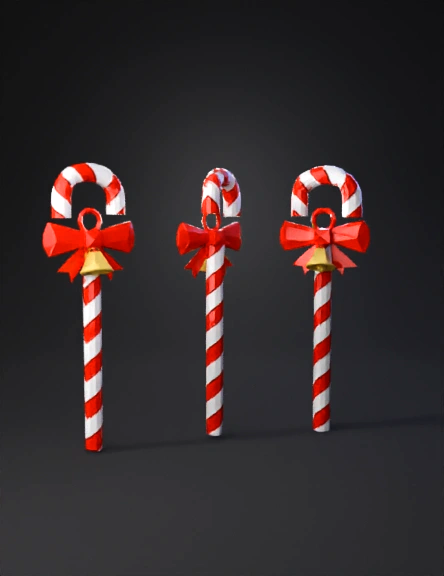
candy cane 3d model
Tags
candy
candy cane
cane
game asset
game asset stylized
props
props game asset
props game asset stylized
props stylized
stylized
Input
Prompt
Create a low-poly Christmas candy cane staff designed specifically as a Roblox Studio accessory. The staff should have a classic candy cane shape, with a smooth curved hook at the top and a straight shaft, modeled using simple low-poly geometry, clean edges, and clearly defined facets. The candy cane should feature bold red and white spiral stripes, stylized in a low-poly manner with flat colors and minimal shading, avoiding realistic textures. The geometry should remain lightweight and optimized for Roblox, with visible polygonal surfaces and sharp, readable forms. Add festive Christmas details while keeping the low-poly aesthetic: Small low-poly ribbon or bow near the top, in red or green Optional tiny bell attached with a simple geometric loop Subtle engraved snowflake patterns or raised shapes on the shaft A faint magical winter glow or sparkling frost effect near the hook (stylized, not realistic) The material should look like stylized candy, slightly glossy but still flat-shaded, consistent with Roblox’s accessory style. No high-resolution textures; rely on solid colors and geometry for detail. Use a clean color palette: bright white, candy-red, soft green, gold accents, and optional icy blue highlights. The overall design should feel festive, magical, premium, and playful, while remaining fully compatible with low-poly Roblox accessories. Present the model in multiple angles (front, side, and perspective view) with neutral lighting and background, clearly showing the shape, proportions, and polygon structure.
Detailed Info
Related Models
Enter invite code
Enter invite code to get credits!
 oficisantz22


 oficisantz22