3D Workspace
Home
Assets
Affiliate Program
Sign up/Log in
?
Upgrade
DCC Bridge
Anonymous1763480317
11-18 15:39
Model Name
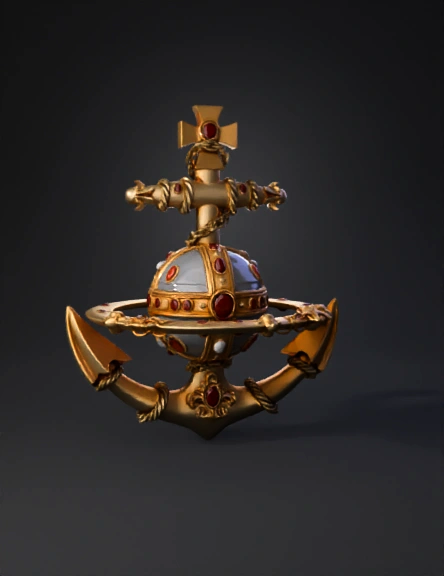
ornate anchor 3d model
Tags
props
rendering
realistic
Input
Prompt
Create a single, vertically aligned sculptural object inspired by the reference image. CENTER SPHERE: - Place a PERFECTLY ROUND SPHERE at the center with NO distortion. - The sphere must be 100% TRANSPARENT, like clear crystal or polished glass. - Apply HIGH-GLOSS reflections and bright specular highlights. - Inside the sphere, add subtle warm light or reflections, but keep the outer shell perfectly clear. MAIN STRUCTURE MATERIAL: - All components EXCEPT the sphere should use CLEAN, SHINY METALLIC MATERIALS. - Use polished gold, brushed gold, and metal accents for the decorations, frame, and ring. - All tartan fabric elements should be replaced with metallic surfaces or metallized patterns. - Chain, ornaments, anchor, and cross must look like metal sculptures, NOT fabric. SHAPES: - Keep the top cross symmetrical and metallic. - Keep the ring around the sphere perfectly FLAT, smooth, with UNIFORM THICKNESS. - No bending, curling, or organic distortion. - The anchor at the bottom must be metallic, smooth, reflective, and perfectly shaped. DETAILS: - Use red gemstones as metallic insets on the gold surfaces. - The decorative elements should be crisp, sharp, and modern—not aged or dusty. - Remove all cloth-like appearances; everything should read as metal except the transparent sphere. LIGHTING: - Bright, clean reflections. - Modern, glossy material rendering. - No rust, no wear, no grunge. FINAL: - Centered composition. - Perfect vertical alignment. - Render as a single isolated object on a neutral background.
Detailed Info
Related Models
Enter invite code
Enter invite code to get credits!