3D Workspace
Home
Assets
Affiliate Program
Sign up/Log in
?
Upgrade
DCC Bridge
3D Creation Made Simple
Text & Image to 3D Model in seconds
One-Click Texturing & Smart Detail Editing
Free Credits Monthly
Start Free
Anonymous1773484563
03-15 06:50
Model Name
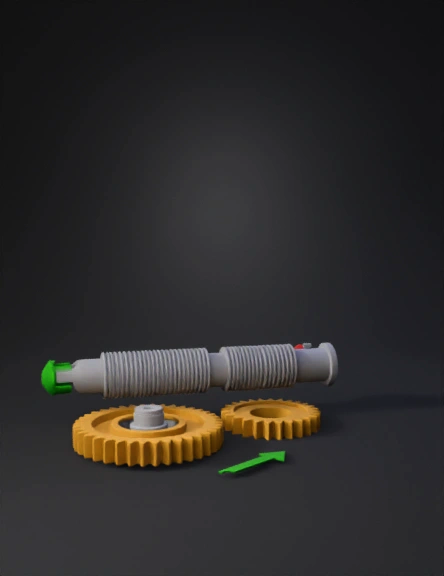
worm gear 3d model
Tags
machine
rendering
realistic
Prompt
Draw a two-stage worm gear system: FIRST STAGE (left side): - Draw a horizontal silver threaded shaft (Worm 1) - Below it, draw a gold gear wheel with 20 teeth (Wheel 1) - Worm 1 touches Wheel 1 (they mesh) SHAFT CONNECTION: - From the CENTER of Wheel 1, a metal shaft extends outward to the right - The shaft of Worm 2 is attached to this shaft - So Wheel 1's center shaft connects directly to Worm 2's shaft - When Wheel 1 spins, its shaft spins, which makes Worm 2 spin SECOND STAGE (right side): - Below Worm 2, draw a gold gear wheel with 18 teeth (Wheel 2) - Worm 2 touches Wheel 2 (they mesh) LABELS: - "20:1" near first pair - "18:1" near second pair - "360:1" at bottom - Green arrow into Worm 1 (input) - Red arrow out of Wheel 2 with dial (output) STYLE: 3D render, isometric view, metallic surfaces
Detailed Info
Related Models
Enter invite code
Enter invite code to get credits!