3D Workspace
Home
Assets
Affiliate Program
Creator Program
Sign up/Log in
View Plans
DCC Bridge
Anonymous1776397929
04-17 04:50
Model Name
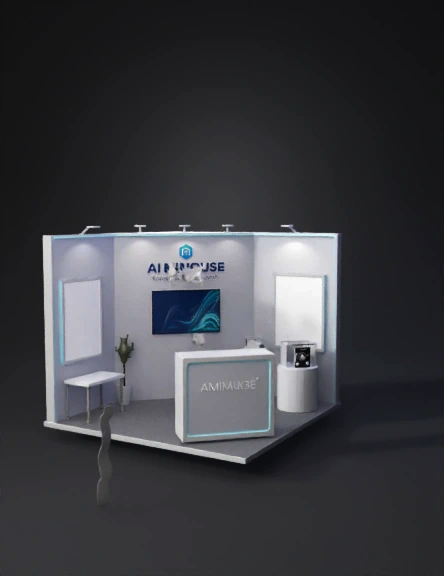
trade show booth 3d model
Tags
architecture
architecture realistic
architecture rendering
architecture rendering realistic
booth
display
realistic
rendering
rendering realistic
trade show booth
Input
Prompt
Generate a 3D model of a standard trade show booth, size 3 meters wide x 3 meters deep x 2.5 meters high (wall height). Booth style: modern tech, white and light gray color scheme, with blue LED accent lines. Structure includes: - Back wall (2.5m high) with a fascia board displaying company name "AI MIMOUSE" and slogan "Centralized AI, One Key Launch". - Left and right side walls (2.5m high) with empty poster frames for product images. - One information counter (0.8m high, 1m wide) at the front center. - One display table (0.75m high, 1.2m wide, 0.6m deep) placed on the left side. - One product pedestal (0.9m high, round, 0.4m diameter) on the right side. - Gray carpet flooring with a subtle grid pattern. - Two spotlights on the ceiling pointing to the display table and pedestal. Reference last year's booth layout (standard 3x3), but update with new product placement. After generating the complete booth model, render the following four views as separate images: 1. Formal perspective view: Camera at 45° angle, height 1.6m, distance 4m from the booth front, facing the booth center. Show the entire front and right side, with clear product display on table. 2. Top view (俯视图): Camera directly above, orthographic projection, height 5m, looking down. Show the 3m x 3m footprint, layout of furniture (counter, table, pedestal) and their positions. 3. Left side view (左侧视图): Camera at ground level, 90° perpendicular to left wall, distance 3m. Show the left wall poster, display table, and depth of booth. 4. Right side view (右侧视图): Camera at ground level, 90° perpendicular to right wall, distance 3m. Show the right wall poster, product pedestal, and back wall edge. All renders should be photorealistic, with consistent lighting and shadows, resolution 1920x1080. Use the uploaded product images as textures: 1. On the display table: Place a 3D model of a wireless AI mouse (MiMouse) based on the uploaded image "1000025915.png". Add a small transparent display stand next to it showing the packaging box from "1000025905.png". 2. On the back wall: Create two poster frames (60cm wide x 80cm high) at eye level. Left frame shows product feature collage from "1000025901.png" (AI tools icons). Right frame shows "Long Battery Life" infographic from "1000025906.png". 3. On the right side wall: Place a vertical poster (50cm wide x 120cm high) with the "17 AI Functions" safety description from "1000025902.png". 4. On the information counter: Place a small tent card showing the "What's Included" list (from "1000025905.png"). All textures must be clearly readable, high resolution.主题是MIMOUSE,LOUGO是图片上那样的,里面背景墙和其它两面侧边的墙上还可以放一些关于咪鼠AI键鼠的产品图
Detailed Info
Related Models
Enter invite code
Enter invite code to get credits!
 Anonymous1776397929


 Anonymous1776397929