3D Workspace
Home
Assets
Affiliate Program
Sign up/Log in
?
Upgrade
DCC Bridge
Anonymous1759396117
10-03 08:26
Model Name
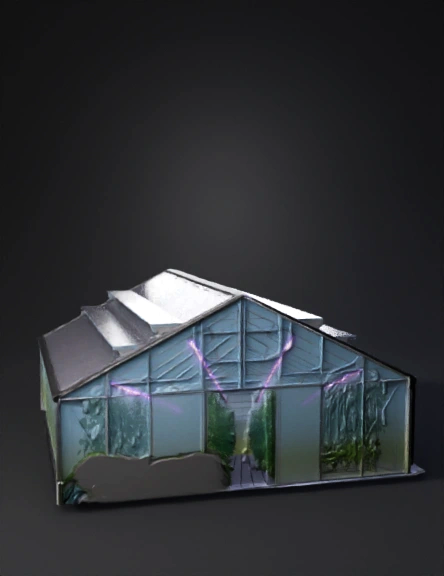
glass greenhouse 3d model
Tags
architecture
rendering
realistic
Prompt
import bpy import math from mathutils import Vector # --- Nadiifi waxyaabaha jirta --- bpy.ops.wm.read_factory_settings(use_empty=True) # --- Parameters --- farm_size = 1000.0 # in meters half = farm_size / 2.0 # Crop plot dimensions (quarter each) plot_w = farm_size / 2.0 plot_h = farm_size / 2.0 # Greenhouse dimensions gh_length = 50.0 gh_width = 30.0 gh_height = 20.0 # Drip irrigation spacing irrigation_interval = 5.0 # meters between drip lines # Camera animation length scene = bpy.context.scene scene.frame_start = 1 scene.frame_end = 30 * scene.render.fps # 30 seconds animation # --- Create ground plane --- bpy.ops.mesh.primitive_plane_add(size=farm_size, location=(0, 0, 0)) ground = bpy.context.active_object ground.name = "Ground" # Add material to ground mat_g = bpy.data.materials.new(name="GroundMat") mat_g.diffuse_color = (0.4, 0.8, 0.4, 1.0) ground.data.materials.append(mat_g) # --- Function to create crop region --- def make_crop_region(x_center, y_center, dx, dy, color): bpy.ops.mesh.primitive_plane_add(size=1, location=(x_center, y_center, 0)) obj = bpy.context.active_object obj.name = f"Crop_{x_center:.1f}_{y_center:.1f}" obj.scale = (dx / 2.0, dy / 2.0, 1) mat = bpy.data.materials.new(name=f"Mat_{x_center}_{y_center}") mat.diffuse_color = (*color, 1.0) obj.data.materials.append(mat) return obj # --- Create 4 crop areas --- # Yaanyo (top-left) make_crop_region(-half/2, half/2, plot_w, plot_h, (1.0, 0.0, 0.0)) # red # Strawberry (top-right) make_crop_region(half/2, half/2, plot_w, plot_h, (0.8, 0.2, 0.2)) # Basbaas (bottom-left) make_crop_region(-half/2, -half/2, plot_w, plot_h, (0.0, 1.0, 0.0)) # Qamadi (bottom-right) make_crop_region(half/2, -half/2, plot_w, plot_h, (1.0, 1.0, 0.0)) # --- Create greenhouse --- bpy.ops.mesh.primitive_cube_add(size=1, location=(0, 0, gh_height/2)) gh = bpy.context.active_object gh.name = "Greenhouse" gh.scale = (gh_length/2, gh_width/2, gh_height/2) # Make greenhouse transparent material mat_gh = bpy.data.materials.new(name="GreenhouseMat") mat_gh.use_nodes = True nodes = mat_gh.node_tree.nodes links = mat_gh.node_tree.links for n in nodes: nodes.remove(n) # Nodes node_out = nodes.new(type="ShaderNodeOutputMaterial") node_bsdf = nodes.new(type="ShaderNodeBsdfGlass") node_bsdf.inputs["Color"].default_value = (0.8, 0.9, 1.0, 1.0) node_bsdf.inputs["Roughness"].default_value = 0.1 links.new(node_bsdf.outputs["BSDF"], node_out.inputs["Surface"]) gh.data.materials.append(mat_gh) # --- Create drip irrigation lines --- def add_drip_line(x_start, y, length): bpy.ops.curve.primitive_bezier_curve_add(location=(x_start, y, 0.01)) c = bpy.context.active_object c.name = "DripLine" # scale in x-direction c.scale = (length, 1, 1) # bevel to make it visible c.data.bevel_depth = 0.02 c.data.bevel_resolution = 3 mat = bpy.data.materials.new(name="PipeMat") mat.diffuse_color = (0.1, 0.1, 0.1, 1.0) c.data.materials.append(mat) return c # Create drip lines in each crop area y_positions = [half/4, -half/4] x_min = -half x_max = half for y in y_positions: y_base = y x = x_min while x <= x_max: add_drip_line(x, y_base, farm_size) x += irrigation_interval # --- Camera setup and animation path --- cam_data = bpy.data.cameras.new("Camera") cam = bpy.data.objects.new("Camera", cam_data) scene.collection.objects.link(cam) scene.camera = cam # Create a path (Bezier curve) for camera bpy.ops.curve.primitive_bezier_curve_add() path = bpy.context.active_object path.name = "CamPath" # adjust control points p0 = path.data.splines[0].bezier_points[0] p1 = path.data.splines[0].bezier_points[1] p0.co = Vector((-half, -half, 50)) p1.co = Vector((half, half, 80)) # optional handle tweaks to smooth p0.handle_right_type = 'AUTO' p1.handle_left_type = 'AUTO'
Detailed Info
Related Models
Enter invite code
Enter invite code to get credits!