3D Workspace
Home
Assets
Affiliate Program
Sign up/Log in
?
Upgrade
DCC Bridge
3D Creation Made Simple
Text & Image to 3D Model in seconds
One-Click Texturing & Smart Detail Editing
Free Credits Monthly
Start Free
Anonymous1775579473
04-07 16:37
Model Name
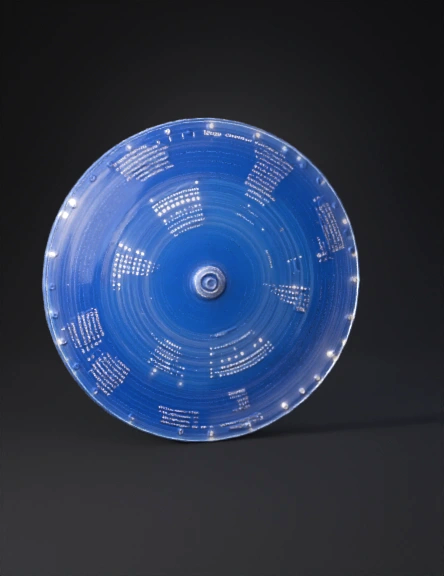
glass disc 3d model
Tags
props
rendering
realistic
Prompt
import b3D Animation Scenario: Rotating Glass Disc Forming a Light Sphere 1. Main Concept A transparent glass disc is positioned vertically and rotates step-by-step around a vertical axis. On its edge, 12 LED-like lights are arranged like the numbers on a clock. As the disc rotates in 12 steps (15° each) and new sets of lights turn on, a spherical light structure gradually forms in 3D space. 2. Disc Setup Object: Circular disc Orientation: Vertical Material: Transparent (glass shader) Low roughness Slight reflection for realism 3. LED Lights Arrangement Place 12 light points evenly on the circumference Angle between each: 30° Each light is: A small emissive sphere or point light Labeling: First rotation: 1–12 Second: 13–24 Continue sequentially 4. Light Activation Animation Lights turn on one by one in clockwise direction Suggested timing: ~0.2 seconds between each light When each light turns on: Display its corresponding number (Text object) 5. Disc Rotation Logic After each full cycle of 12 lights: Rotate the disc 15 degrees around the vertical axis Repeat this 12 times This creates: 12 × 15° = 180° (half rotation) With continuous looping → full spherical effect 6. Sphere Formation Effect Because each new set of lights appears at a slightly rotated angle: The lights accumulate in space Visually forming a 3D sphere made of light points Sequence example: Step 1 → lights 1–12 Step 2 → lights 13–24 Step 3 → lights 25–36 ...and so on 7. Important Visual Detail (Front View Effect) At the 12th rotation step: The disc is effectively seen from the back side Therefore: The light sequence appears counterclockwise from the front view This creates a realistic and physically accurate visual effect. 8. Camera Movement To make the video more dynamic, include multiple camera angles: Front view 45° perspective view Orbiting camera around the sphere Close-up shots of lights activating 9. Visual Effects Bloom/Glow → for LED lights Motion Blur → during rotation Depth of Field → cinematic focus 10. Ending Scene When the final number appears (e.g., 144): All lights remain ON Full sphere is visible End with: Slow fade out 🧠 Animation Logic (Simplified) For each step: Turn on 12 lights (clockwise) Display numbers Rotate disc by 15 degrees Repeat until full sphere is formedpy import math # ------------------------- # Reset Scene # ------------------------- bpy.ops.object.select_all(action='SELECT') bpy.ops.object.delete(use_global=False) scene = bpy.context.scene scene.frame_end = 2000 # ------------------------- # Settings # ------------------------- radius = 2 num_lights = 12 steps = 12 angle_step = math.radians(15) frame_gap = 6 # ------------------------- # Eevee + Bloom # ------------------------- scene.render.engine = 'BLENDER_EEVEE' scene.eevee.use_bloom = True scene.eevee.bloom_intensity = 0.08 # ------------------------- # Create Disc # ------------------------- bpy.ops.mesh.primitive_cylinder_add(radius=radius, depth=0.05) disc = bpy.context.object disc.rotation_euler[0] = math.radians(90) # Glass Material mat = bpy.data.materials.new("Glass") mat.use_nodes = True nodes = mat.node_tree.nodes links = mat.node_tree.links nodes.clear() output = nodes.new("ShaderNodeOutputMaterial") glass = nodes.new("ShaderNodeBsdfGlass") glass.inputs['Roughness'].default_value = 0.02 glass.inputs['IOR'].default_value = 1.45 links.new(glass.outputs[0], output.inputs[0]) disc.data.materials.append(mat) # ------------------------- # Create LED Template # ------------------------- def create_led(location): bpy.ops.mesh.primitive_uv_sphere_add(radius=0.08, location=location) obj = bpy.context.object mat = bpy.data.materials.new("LED") mat.use_nodes = True nodes = mat.node_tree.nodes links = mat.node_tree.links nodes.clear() output = nodes.new("ShaderNodeOutputMaterial") emission = nodes.new("ShaderNodeEmission") emission.inputs['Strength'].default_value = 0 links.new(emission.outputs[0], output.inputs[0]) obj.data.materials.append(mat) return obj, emission # ------------------------- # Animation # ------------------------- frame = 1 counter = 1 for step in range(steps): current_angle = step * angle_step for i in range(num_lights): angle = i * (2 * math.pi / num_lights) # موقعیت در فضای چرخیده (برای ساخت کره) x = radius * math.cos(angle) * math.cos(current_angle) y = radius * math.sin(angle) z = radius * math.cos(angle) * math.sin(current_angle) led, emission = create_led((x, y, z)) # روشن شدن emission.inputs['Strength'].keyframe_insert('default_value', frame=frame) emission.inputs['Strength'].default_value = 20 emission.inputs['Strength'].keyframe_insert('default_value', frame=frame+2) # Text Number bpy.ops.object.text_add(location=(x, y, z + 0.2)) txt = bpy.context.object txt.data.body = str(counter) txt.scale = (0.25,0.25,0.25) # همیشه رو به دوربین constraint = txt.constraints.new(type='TRACK_TO') constraint.track_axis = 'TRACK_Z' constraint.up_axis = 'UP_Y' counter += 1 frame += frame_gap # چرخش دیسک disc.rotation_euler[2] = current_angle disc.keyframe_insert(data_path="rotation_euler", frame=frame) # ------------------------- # Camera (Cinematic Orbit) # ------------------------- bpy.ops.object.camera_add(location=(6, -6, 4)) cam = bpy.context.object bpy.context.scene.camera = cam empty = bpy.data.objects.new("Empty", None) bpy.context.collection.objects.link(empty) cam.parent = empty for f in range(1, scene.frame_end, 20): empty.rotation_euler[2] += math.radians(5) empty.keyframe_insert(data_path="rotation_euler", frame=f) # ------------------------- # Light # ------------------------- bpy.ops.object.light_add(type='AREA', location=(5,5,5)) light = bpy.context.object light.data.energy = 500 # ------------------------- # World Background # ------------------------- bpy.data.worlds["World"].node_tree.nodes["Background"].inputs[1].default_value = 0.1
Detailed Info
Related Models
Enter invite code
Enter invite code to get credits!