3D Workspace
Home
Assets
Affiliate Program
Sign up/Log in
?
Upgrade
DCC Bridge
Anonymous1768662473
01-17 15:15
Model Name
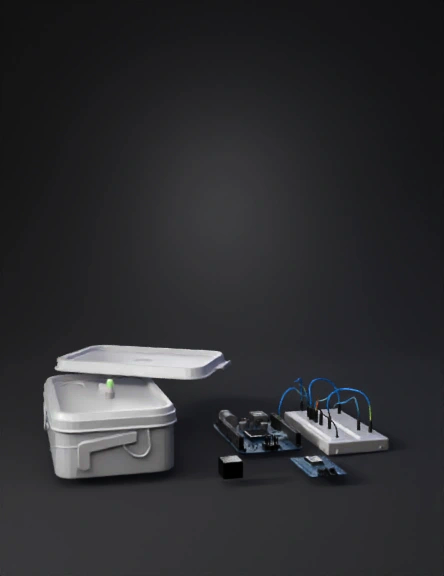
arduino kit 3d model
Tags
import bpy
props
props realistic
props rendering
props rendering realistic
realistic
rendering
rendering realistic
Input
Prompt
import bpy # Clear scene bpy.ops.object.select_all(action='SELECT') bpy.ops.object.delete(use_global=False) # ---------- Materials ---------- def make_material(name, color, alpha=1): mat = bpy.data.materials.new(name) mat.use_nodes = True bsdf = mat.node_tree.nodes["Principled BSDF"] bsdf.inputs["Base Color"].default_value = (*color, 1) bsdf.inputs["Alpha"].default_value = alpha if alpha < 1: mat.blend_method = 'BLEND' return mat plastic_clear = make_material("PlasticClear", (0.9, 0.9, 0.9), 0.3) plastic_white = make_material("PlasticWhite", (1, 1, 1)) green_led = make_material("GreenLED", (0, 1, 0)) blue_board = make_material("BoardBlue", (0.1, 0.3, 0.8)) black = make_material("Black", (0, 0, 0)) # ---------- Container ---------- bpy.ops.mesh.primitive_cube_add(size=2, location=(0, 0, 1)) container = bpy.context.object container.scale = (2, 1.4, 0.8) container.data.materials.append(plastic_clear) # ---------- Lid ---------- bpy.ops.mesh.primitive_cube_add(size=2, location=(0, 0, 2)) lid = bpy.context.object lid.scale = (2.05, 1.45, 0.15) lid.data.materials.append(plastic_white) # ---------- LED Indicator ---------- bpy.ops.mesh.primitive_cylinder_add(radius=0.08, depth=0.05, location=(0, 0, 2.1)) led = bpy.context.object led.rotation_euler[0] = 1.57 led.data.materials.append(green_led) # ---------- Arduino UNO ---------- bpy.ops.mesh.primitive_cube_add(size=1, location=(3, 0, 0.3)) arduino = bpy.context.object arduino.scale = (1.2, 0.7, 0.1) arduino.data.materials.append(blue_board) # ---------- Breadboard ---------- bpy.ops.mesh.primitive_cube_add(size=1, location=(3, 1.2, 0.25)) breadboard = bpy.context.object breadboard.scale = (1.1, 0.5, 0.08) breadboard.data.materials.append(plastic_white) # ---------- Temperature Sensor ---------- bpy.ops.mesh.primitive_cube_add(size=0.3, location=(3, -1, 0.25)) sensor = bpy.context.object sensor.data.materials.append(black) # ---------- Bluetooth Module ---------- bpy.ops.mesh.primitive_cube_add(size=0.4, location=(4.5, 0, 0.25)) bluetooth = bpy.context.object bluetooth.data.materials.append(blue_board) # ---------- Light ---------- bpy.ops.object.light_add(type='AREA', location=(0, 0, 6)) light = bpy.context.object light.data.energy = 800 # ---------- Camera ---------- bpy.ops.object.camera_add(location=(8, -8, 5)) camera = bpy.context.object camera.rotation_euler = (1.2, 0, 0.8) bpy.context.scene.camera = camera
Detailed Info
Related Models
Enter invite code
Enter invite code to get credits!
 Anonymous1768662473


 Anonymous1768662473