3D Workspace
Home
Assets
Affiliate Program
Creator Program
Sign up/Log in
View Plans
DCC Bridge
rajahyder001
11-02 06:51
Model Name
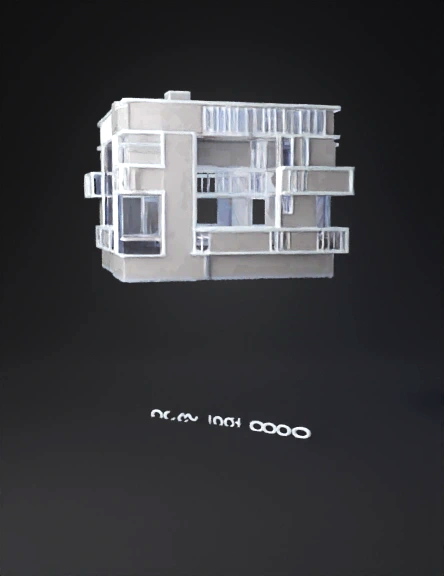
architectural blueprint 3d model
Tags
architectural blueprint
architecture
architecture rendering
architecture rendering sci fi
architecture sci fi
rendering
rendering sci fi
sci fi
Prompt
import bpy from math import radians # ---- CLEAN SCENE ---- bpy.ops.object.select_all(action='SELECT') bpy.ops.object.delete() # ---- ADD YOUR EXISTING MODEL HERE ---- # Example placeholder cube (delete when you import your own model) bpy.ops.mesh.primitive_cube_add(size=10, location=(0, 0, 5)) building = bpy.context.active_object building.name = "Project_Altaf_Residence" # ---- BLUEPRINT MATERIAL ---- mat = bpy.data.materials.new(name="Blueprint_Mat") mat.use_nodes = True nodes = mat.node_tree.nodes for n in nodes: nodes.remove(n) output = nodes.new(type="ShaderNodeOutputMaterial") emission = nodes.new(type="ShaderNodeEmission") emission.inputs['Color'].default_value = (1, 1, 1, 1) # white glow emission.inputs['Strength'].default_value = 2.5 mat.node_tree.links.new(emission.outputs['Emission'], output.inputs['Surface']) building.data.materials.append(mat) # ---- WORLD BACKGROUND ---- bpy.data.worlds["World"].node_tree.nodes["Background"].inputs[0].default_value = (0.0, 0.02, 0.15, 1) # ---- CAMERA SETUP ---- bpy.ops.object.camera_add(location=(25, 0, 12)) cam = bpy.context.active_object cam.name = "DroneCam" bpy.context.scene.camera = cam # Empty for rotation path bpy.ops.object.empty_add(type='PLAIN_AXES', location=(0, 0, 0)) pivot = bpy.context.active_object cam.parent = pivot cam.location.x = 25 # Animation 360° clockwise in 60 seconds pivot.rotation_euler = (0, 0, 0) pivot.keyframe_insert(data_path="rotation_euler", frame=1) pivot.rotation_euler[2] = radians(-360) pivot.keyframe_insert(data_path="rotation_euler", frame=1800) # 30 fps × 60 s # Linear motion for fcurve in pivot.animation_data.action.fcurves: for kp in fcurve.keyframe_points: kp.interpolation = 'LINEAR' # ---- LIGHTS ---- bpy.ops.object.light_add(type='AREA', location=(0, 0, 30)) bpy.context.object.data.energy = 4000 # ---- TEXT LABEL ---- bpy.ops.object.text_add(location=(0, -20, 2)) txt = bpy.context.active_object txt.data.body = "Project Altaf Residence" txt.rotation_euler[0] = radians(90) txt.data.size = 2 txt.data.align_x = 'CENTER' txt.data.align_y = 'CENTER' txt.data.extrude = 0.02 # ---- RENDER SETTINGS ---- scene = bpy.context.scene scene.render.engine = 'CYCLES' scene.cycles.device = 'GPU' scene.frame_start = 1 scene.frame_end = 1800 scene.render.fps = 30 scene.render.image_settings.file_format = 'FFMPEG' scene.render.ffmpeg.format = 'MPEG4' scene.render.filepath = "//Project_Altaf_Residence.mp4" scene.render.resolution_x = 3840 scene.render.resolution_y = 2160 print("✅ Blueprint animation setup complete! Ready to render 1-minute 4K video.")
Detailed Info
Related Models
Enter invite code
Enter invite code to get credits!
 rajahyder001


 rajahyder001