3D Workspace
Home
Assets
Affiliate Program
Sign up/Log in
?
Upgrade
DCC Bridge
Anonymous1758735642
09-24 17:43
Model Name
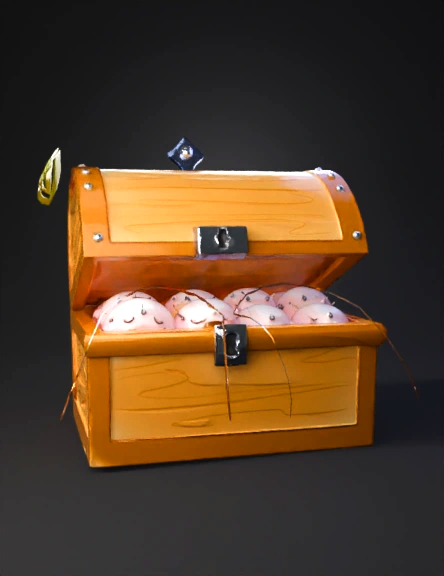
cartoon treasure chest 3d model
Tags
cartoon
game asset
game asset cartoon
import bpy
props
props cartoon
props game asset
props game asset cartoon
Input
Prompt
import bpy import math # Clean the scene bpy.ops.object.select_all(action='SELECT') bpy.ops.object.delete(use_global=False) # ------------------------- # Create the golden box base # ------------------------- bpy.ops.mesh.primitive_cube_add(size=2, location=(0, 0, 0)) box = bpy.context.active_object box.scale[2] = 0.5 box.name = "Box" # Create a golden material gold_mat = bpy.data.materials.new(name="Gold") gold_mat.use_nodes = True bsdf = gold_mat.node_tree.nodes["Principled BSDF"] bsdf.inputs["Base Color"].default_value = (1.0, 0.8, 0.2, 1) # Gold yellow bsdf.inputs["Roughness"].default_value = 0.4 box.data.materials.append(gold_mat) # ------------------------- # Create the lid (separate object for animation) # ------------------------- bpy.ops.mesh.primitive_cube_add(size=2, location=(0, 0, 0.55)) lid = bpy.context.active_object lid.scale[2] = 0.1 lid.name = "Lid" lid.data.materials.append(gold_mat) # Set origin to left edge for rotation bpy.ops.object.origin_set(type='ORIGIN_CURSOR', center='MEDIAN') # ------------------------- # Create smiley spheres # ------------------------- smileys = [] for i in range(3): bpy.ops.mesh.primitive_uv_sphere_add(radius=0.3, location=(-0.5 + i*0.5, 0, 0.3)) s = bpy.context.active_object s.name = f"Smiley_{i}" # Create red cartoon material mat = bpy.data.materials.new(name=f"SmileyMat_{i}") mat.use_nodes = True mat.node_tree.nodes["Principled BSDF"].inputs["Base Color"].default_value = (1, 0.3, 0.3, 1) s.data.materials.append(mat) # Create eyes (two black spheres) bpy.ops.mesh.primitive_uv_sphere_add(radius=0.05, location=(s.location.x-0.08, s.location.y+0.28, s.location.z+0.1)) left_eye = bpy.context.active_object bpy.ops.mesh.primitive_uv_sphere_add(radius=0.05, location=(s.location.x+0.08, s.location.y+0.28, s.location.z+0.1)) right_eye = bpy.context.active_object for eye in (left_eye, right_eye): eye_mat = bpy.data.materials.new(name="EyeMat") eye_mat.use_nodes = True eye_mat.node_tree.nodes["Principled BSDF"].inputs["Base Color"].default_value = (0, 0, 0, 1) eye.data.materials.append(eye_mat) smileys.append((s, left_eye, right_eye)) # ------------------------- # Animate lid opening # ------------------------- lid.keyframe_insert(data_path="rotation_euler", frame=1) lid.rotation_euler[1] = math.radians(-100) lid.keyframe_insert(data_path="rotation_euler", frame=40) # ------------------------- # Animate smileys jumping + eye blink # ------------------------- frame = 50 for s, left_eye, right_eye in smileys: Slowly slowly open this box and jump out a circular smiley like inside box image Image look same as attached image
Detailed Info
Related Models
Enter invite code
Enter invite code to get credits!
 Anonymous1758735642


 Anonymous1758735642