3D Workspace
Home
Assets
Affiliate Program
Sign up/Log in
?
Upgrade
DCC Bridge
Anonymous1770803511
02-12 08:08
Model Name
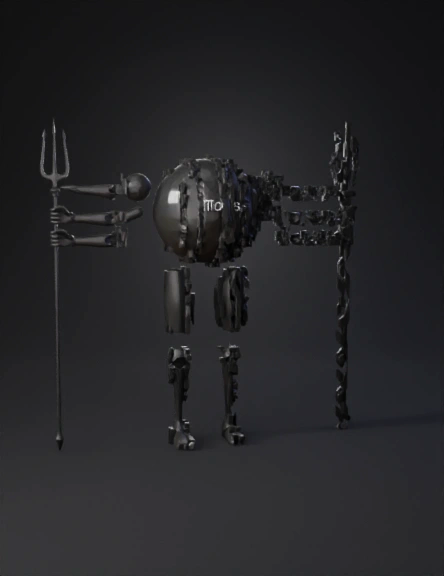
multi-armed deity 3d model
Tags
character
character rendering
character rendering stylized
character stylized
import bpy
multi armed deity
rendering
rendering stylized
stylized
Prompt
import bpy import math # Clear scene bpy.ops.object.select_all(action='SELECT') bpy.ops.object.delete(use_global=False) # Create body (torso) bpy.ops.mesh.primitive_uv_sphere_add(radius=1.2, location=(0, 0, 3)) torso = bpy.context.object torso.name = "Torso" # Create head bpy.ops.mesh.primitive_uv_sphere_add(radius=0.7, location=(0, 0, 4.8)) head = bpy.context.object head.name = "Head" # Create leg bpy.ops.mesh.primitive_cylinder_add(radius=0.4, depth=3, location=(0, 0, 1.5)) leg = bpy.context.object leg.name = "Leg" # Create multiple arms arm_objects = [] arm_count = 6 radius = 2.2 for i in range(arm_count): angle = (2 * math.pi / arm_count) * i x = radius * math.cos(angle) y = radius * math.sin(angle) bpy.ops.mesh.primitive_cylinder_add(radius=0.2, depth=3, location=(x/2, y/2, 3.5)) arm = bpy.context.object arm.rotation_euler[2] = angle arm.name = f"Arm_{i+1}" arm_objects.append(arm) # Create trident (simple) bpy.ops.mesh.primitive_cylinder_add(radius=0.1, depth=5, location=(2, 0, 4)) trident = bpy.context.object trident.name = "Trident" # Add material (dark stone look) mat = bpy.data.materials.new(name="Stone") mat.use_nodes = True bsdf = mat.node_tree.nodes["Principled BSDF"] bsdf.inputs["Base Color"].default_value = (0.05, 0.05, 0.05, 1) bsdf.inputs["Roughness"].default_value = 0.9 for obj in [torso, head, leg] + arm_objects + [trident]: if obj.data.materials: obj.data.materials[0] = mat else: obj.data.materials.append(mat) print("Multi-armed deity base model created!")
Detailed Info
Related Models
Enter invite code
Enter invite code to get credits!
 Anonymous1770803511


 Anonymous1770803511