3D Workspace
Home
Assets
Affiliate Program
Sign up/Log in
?
Upgrade
DCC Bridge
Anonymous1766032525
12-18 08:34
Model Name
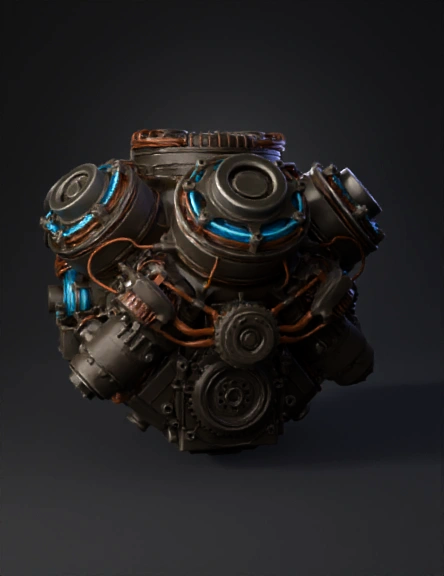
futuristic engine 3d model
Tags
futuristic engine
import bpy
machine
machine rendering
machine rendering sci fi
machine sci fi
rendering
rendering sci fi
sci fi
Prompt
import bpy import math def setup_environment(): # 1. Scene Setup (Render Style & Resolution) scene = bpy.context.scene scene.render.engine = 'CYCLES' scene.cycles.device = 'GPU' # Assumes GPU, falls back if needed # "render_style": "Photorealistic 4K" scene.render.resolution_x = 3840 scene.render.resolution_y = 2160 scene.render.resolution_percentage = 100 # "lighting_and_preview": "neutral studio HDRI" world = bpy.context.scene.world world.use_nodes = True bg_node = world.node_tree.nodes['Background'] bg_node.inputs[1].default_value = 1.0 # Strength def create_pbr_material(): # 2. Material Setup ("materials": "physically based (PBR)") mat = bpy.data.materials.new(name="PBR_Generated_Material") mat.use_nodes = True nodes = mat.node_tree.nodes links = mat.node_tree.links # Clear default nodes.clear() # Create Principled BSDF shader = nodes.new(type='ShaderNodeBsdfPrincipled') shader.location = (0, 0) # Create Output output = nodes.new(type='ShaderNodeOutputMaterial') output.location = (300, 0) links.new(shader.outputs['BSDF'], output.inputs['Surface']) # Create Texture Slots ("maps": ["base_color", "roughness", "metallic", "normal"]) # Note: User must load actual images into these slots tex_coords = nodes.new(type='ShaderNodeTexCoord') mapping = nodes.new(type='ShaderNodeMapping') links.new(tex_coords.outputs['UV'], mapping.inputs['Vector']) node_y = 600 map_types = ["Base Color", "Roughness", "Metallic", "Normal"] for map_type in map_types: tex_node = nodes.new(type='ShaderNodeTexImage') tex_node.label = f"Load {map_type} Here" tex_node.location = (-600, node_y) links.new(mapping.outputs['Vector'], tex_node.inputs['Vector']) # Link to Principled BSDF based on name if map_type == "Base Color": links.new(tex_node.outputs['Color'], shader.inputs['Base Color']) elif map_type == "Roughness": tex_node.image_user.use_auto_refresh = False if hasattr(shader.inputs, 'Roughness'): links.new(tex_node.outputs['Color'], shader.inputs['Roughness']) elif map_type == "Metallic": if hasattr(shader.inputs, 'Metallic'): links.new(tex_node.outputs['Color'], shader.inputs['Metallic']) elif map_type == "Normal": normal_map = nodes.new(type='ShaderNodeNormalMap') normal_map.location = (-300, node_y) links.new(tex_node.outputs['Color'], normal_map.inputs['Color']) links.new(normal_map.outputs['Normal'], shader.inputs['Normal']) node_y -= 300 return mat def setup_cameras(): # 3. Camera Setup ("camera_views": [...]) camera_data = [ {"name": "Cam_Front", "loc": (0, -3, 1), "rot": (math.radians(90), 0, 0)}, {"name": "Cam_Back", "loc": (0, 3, 1), "rot": (math.radians(90), 0, math.radians(180))}, {"name": "Cam_Left", "loc": (-3, 0, 1), "rot": (math.radians(90), 0, math.radians(-90))}, {"name": "Cam_Right", "loc": (3, 0, 1), "rot": (math.radians(90), 0, math.radians(90))}, {"name": "Cam_Top", "loc": (0, 0, 4), "rot": (0, 0, 0)}, {"name": "Cam_Persp_3/4", "loc": (2, -2, 1.5), "rot": (math.radians(60), 0, math.radians(45))}, ] collection = bpy.data.collections.new("Render_Cameras") bpy.context.scene.collection.children.link(collection) for cam in camera_data: c = bpy.data.cameras.new(cam["name"]) o = bpy.data.objects.new(cam["name"], c) o.location = cam["loc"] o.rotation_euler = cam["rot"] collection.objects.link(o) # Execute setup_environment() mat = create_pbr_material() setup_cameras() print("Scene setup complete based on JSON specification.")
Detailed Info
Related Models
Enter invite code
Enter invite code to get credits!
 Anonymous1766032525


 Anonymous1766032525