3D Workspace
Home
Assets
Affiliate Program
Creator Program
Sign up/Log in
View Plans
DCC Bridge
Anonymous1765461550
12-17 12:19
Model Name
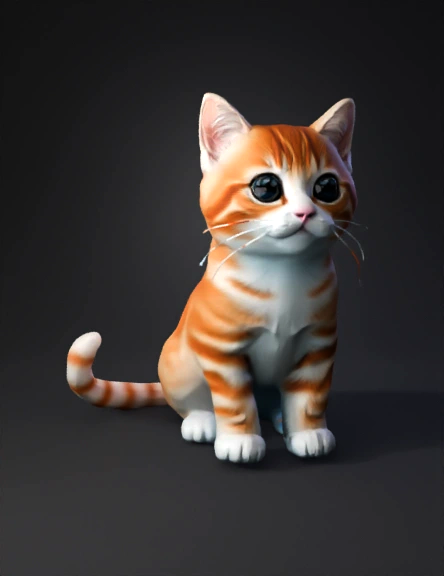
orange tabby kitten 3d model
Tags
cartoon
creatures animals
creatures animals cartoon
creatures animals game asset
creatures animals game asset cartoon
game asset
game asset cartoon
import bpy
orange tabby kitten
Input
Prompt
import bpy import math import random def cleanup(): # Deselect all if bpy.context.object: bpy.ops.object.mode_set(mode='OBJECT') bpy.ops.object.select_all(action='DESELECT') # Select and delete meshes and armatures for obj in bpy.data.objects: if obj.type in ['MESH', 'ARMATURE']: obj.select_set(True) bpy.ops.object.delete() def create_materials(): # 1. Fur Material (Procedural) mat_fur = bpy.data.materials.new(name="CatFur") mat_fur.use_nodes = True nodes = mat_fur.node_tree.nodes links = mat_fur.node_tree.links # Clear default nodes nodes.clear() # Output node_out = nodes.new(type='ShaderNodeOutputMaterial') node_out.location = (400, 0) # Principled BSDF node_bsdf = nodes.new(type='ShaderNodeBsdfPrincipled') node_bsdf.location = (0, 0) node_bsdf.inputs['Roughness'].default_value = 0.9 # Color Ramp node_ramp = nodes.new(type='ShaderNodeValToRGB') node_ramp.location = (-300, 0) node_ramp.color_ramp.elements[0].color = (0.8, 0.4, 0.05, 1) # Darker Orange node_ramp.color_ramp.elements[1].color = (1.0, 0.6, 0.1, 1) # Lighter Orange # Noise Texture node_noise = nodes.new(type='ShaderNodeTexNoise') node_noise.location = (-500, 0) node_noise.inputs['Scale'].default_value = 20.0 # Links links.new(node_noise.outputs['Fac'], node_ramp.inputs['Fac']) links.new(node_ramp.outputs['Color'], node_bsdf.inputs['Base Color']) links.new(node_bsdf.outputs['BSDF'], node_out.inputs['Surface']) # 2. Eye Material (Shiny Black) mat_eye = bpy.data.materials.new(name="CatEye") mat_eye.use_nodes = True bsdf_eye = mat_eye.node_tree.nodes["Principled BSDF"] bsdf_eye.inputs['Base Color'].default_value = (0.0, 0.0, 0.0, 1.0) bsdf_eye.inputs['Roughness'].default_value = 0.1 bsdf_eye.inputs['Specular IOR Level'].default_value = 0.5 # 3. Nose Material (Pink soft) mat_nose = bpy.data.materials.new(name="CatNose") mat_nose.use_nodes = True bsdf_nose = mat_nose.node_tree.nodes["Principled BSDF"] bsdf_nose.inputs['Base Color'].default_value = (1.0, 0.4, 0.5, 1.0) bsdf_nose.inputs['Roughness'].default_value = 0.6 return mat_fur, mat_eye, mat_nose def create_cat(): mat_fur, mat_eye, mat_nose = create_materials() parts = [] # Helper to add object and smooth it def add_mesh(obj): obj.data.materials.append(mat_fur) # Shade Smooth for poly in obj.data.polygons: poly.use_smooth = True parts.append(obj) return obj # 1. Body bpy.ops.mesh.primitive_cube_add(size=1, location=(0, 0, 1)) body = bpy.context.active_object body.name = "Cat_Body" # Adjusted scale for better proportions body.scale = (0.9, 1.2, 0.7) add_mesh(body) # 2. Head bpy.ops.mesh.primitive_uv_sphere_add(radius=0.55, location=(0, -0.9, 1.5)) head = bpy.context.active_object head.name = "Cat_Head" add_mesh(head) # 3. Ears # Ear L bpy.ops.mesh.primitive_cone_add(radius1=0.15, depth=0.35, location=(0.25, -1.0, 1.95)) ear_l = bpy.context.active_object ear_l.name = "Cat_Ear_L" ear_l.rotation_euler = (math.radians(-20), 0, math.radians(20)) add_mesh(ear_l) # Ear R bpy.ops.mesh.primitive_cone_add(radius1=0.15, depth=0.35, location=(-0.25, -1.0, 1.95)) ear_r = bpy.context.active_object ear_r.name = "Cat_Ear_R" ear_r.rotation_euler = (math.radians(-20), 0, math.radians(-20)) add_mesh(ear_r) # 4. Eyes # Eye L bpy.ops.mesh.primitive_uv_sphere_add(radius=0.08, location=(0.18, -1.35, 1.55)) eye_l = bpy.context.active_object eye_l.name = "Cat_Eye_L" eye_l.data.materials.append(mat_eye) # Eye R bpy.ops.mesh.primitive_uv_sphere_add(radius=0.08, location=(-0.18, -1.35, 1.55)) eye_r = bpy.context.active_object eye_r.name = "Cat_Eye_R" eye_r.data.materials.append(mat_eye) parts.extend([eye_l, eye_r]) # 5. Nose bpy.ops.mesh.primitive_cone_add(radius1=0.06, depth=0.1, location=(0, -1.42, 1.45)) nose = bpy.context.active_object nose.name = "Cat_Nose" nose.rotation_euler = (math.radians(90), 0, 0) nose.data.materials.append(mat_nose) parts.append(nose) # 6. Legs - Moved closer to center (X = +/- 0.35) positions = [ (0.35, 0.4, 0.4, "Cat_Leg_BL"), (-0.35, 0.4, 0.4, "Cat_Leg_BR"), (0.35, -0.4, 0.4, "Cat_Leg_FL"), (-0.35, -0.4, 0.4, "Cat_Leg_FR") ] for x, y, z, name in positions: bpy.ops.mesh.primitive_cylinder_add(radius=0.18, depth=0.8, location=(x, y, z)) leg = bpy.context.active_object leg.name = name add_mesh(leg) # 7. Tail (Curved Bezier) # Rooting deeper into body and lower bpy.ops.curve.primitive_bezier_curve_add(location=(0, 0.5, 1.0)) tail_curve = bpy.context.active_object tail_curve.name = "Cat_Tail_Curve" spline = tail_curve.data.splines[0] p0 = spline.bezier_points[0] p1 = spline.bezier_points[1] # Root attached to body p0.co = (0, 0, 0) p0.handle_left = (0, 0, -0.3) p0.handle_right = (0, 0.3, 0.3) # Tip (S-curve feel) p1.co = (0, 0.6, 0.8) p1.handle_left = (0, 0.3, 0.8) p1.handle_right = (0, 0.8, 0.8) # Thinner tail tail_curve.data.bevel_depth = 0.05 tail_curve.data.bevel_resolution = 4 tail_curve.data.use_fill_caps = True # Convert to Mesh bpy.ops.object.convert(target='MESH') tail = bpy.context.active_object tail.name = "Cat_Tail" add_mesh(tail) # Join All bpy.context.view_layer.objects.active = body for part in parts: part.select_set(True) bpy.ops.object.join() cat_mesh = bpy.context.active_object cat_mesh.name = "Cat_Mesh" # Add Subdivision Surface Modifier mod_subsurf = cat_mesh.modifiers.new(name="Subsurf", type='SUBSURF') mod_subsurf.levels = 2 mod_subsurf.render_levels = 2 # Apply Transforms bpy.ops.object.transform_apply(location=True, rotation=True, scale=True) return cat_mesh def create_armature(mesh_obj): # Add Armature bpy.ops.object.armature_add(location=(0,0,0)) amt = bpy.context.active_object amt.name = "Cat_Rig" amt.show_in_front = False # Updated: User requested not showing rig in front bpy.ops.object.mode_set(mode='EDIT') bones = amt.data.edit_bones for b in bones: bones.remove(b) spine = bones.new('Spine') spine.head = (0, 0.5, 1.0) spine.tail = (0, -0.5, 1.0) head_bone = bones.new('Head') head_bone.head = (0, -0.5, 1.0) head_bone.tail = (0, -1.0, 1.5) head_bone.parent = spine # Legs (Updated positions to match new geometry) # FL leg_fl = bones.new('Leg_FL') leg_fl.head = (0.35, -0.4, 0.8) leg_fl.tail = (0.35, -0.4, 0.0) leg_fl.parent = spine # FR leg_fr = bones.new('Leg_FR') leg_fr.head = (-0.35, -0.4, 0.8) leg_fr.tail = (-0.35, -0.4, 0.0) leg_fr.parent = spine # BL leg_bl = bones.new('Leg_BL') leg_bl.head = (0.35, 0.4, 0.8) leg_bl.tail = (0.35, 0.4, 0.0) leg_bl.parent = spine # BR leg_br = bones.new('Leg_BR') leg_br.head = (-0.35, 0.4, 0.8) leg_br.tail = (-0.35, 0.4, 0.0) leg_br.parent = spine tail_bone = bones.new('Tail') tail_bone.head = (0, 0.5, 1.0) tail_bone.tail = (0, 1.0, 1.5) tail_bone.parent = spine bpy.ops.object.mode_set(mode='OBJECT') bpy.ops.object.select_all(action='DESELECT') mesh_obj.select_set(True) amt.select_set(True) bpy.context.view_layer.objects.active = amt bpy.ops.object.parent_set(type='ARMATURE_AUTO') return amt if __name__ == "__main__": cleanup() cat = create_cat() create_armature(cat) base on this create a cat with good structure
Detailed Info
Related Models
Enter invite code
Enter invite code to get credits!