3D Workspace
Home
Assets
Affiliate Program
Sign up/Log in
?
Upgrade
DCC Bridge
Anonymous1759062896
09-28 15:27
Model Name
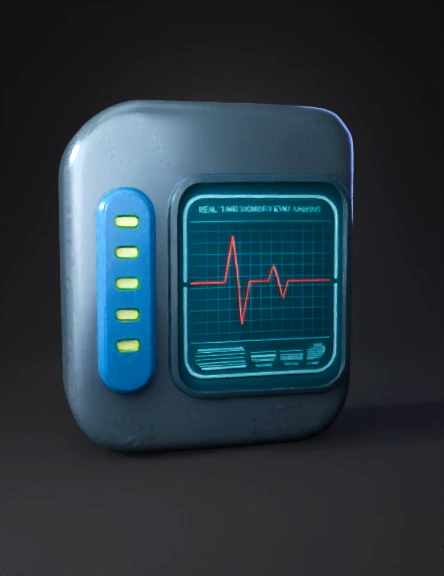
futuristic medical device 3d model
Tags
detector device
diagnostic device
machine
machine rendering
machine rendering sci fi
machine sci fi
rendering
rendering sci fi
sci fi
Prompt
<!DOCTYPE html> <html lang="en"> <head> <meta charset="UTF-8"> <meta name="viewport" content="width=device-width, initial-scale=1.0"> <title>360° Intelligent Diagnosis Device</title> <script src="https://cdn.tailwindcss.com"></script> <style> body { margin: 0; overflow: hidden; font-family: 'Inter', sans-serif; background: #111827; /* Dark gray background */ } canvas { display: block; } #info-panel { position: absolute; top: 2rem; left: 50%; transform: translateX(-50%); text-align: center; color: white; z-index: 10; background-color: rgba(17, 24, 39, 0.6); padding: 1rem 2rem; border-radius: 0.75rem; backdrop-filter: blur(10px); -webkit-backdrop-filter: blur(10px); border: 1px solid rgba(255, 255, 255, 0.1); } #instructions { position: absolute; bottom: 1.5rem; left: 50%; transform: translateX(-50%); color: #9CA3AF; /* Gray-400 */ font-size: 0.875rem; background-color: rgba(17, 24, 39, 0.6); padding: 0.5rem 1rem; border-radius: 9999px; pointer-events: none; } </style> <!-- Import Google Fonts --> <link rel="preconnect" href="https://fonts.googleapis.com"> <link rel="preconnect" href="https://fonts.gstatic.com" crossorigin> <link href="https://fonts.googleapis.com/css2?family=Inter:wght@400;500;700&display=swap" rel="stylesheet"> </head> <body> <!-- UI Elements --> <div id="info-panel"> <h1 class="text-2xl md:text-3xl font-bold text-white tracking-tight">Intelligent Diagnosis Device</h1> <p class="text-sm md:text-base text-gray-300 mt-1">Real-Time Biometric Analysis Unit</p> </div> <div id="instructions"> <span>Click and drag or swipe to rotate the device</span> </div> <!-- Canvas for 3D rendering --> <canvas id="viewer-canvas"></canvas> <!-- Three.js Library --> <script type="importmap"> { "imports": { "three": "https://cdn.jsdelivr.net/npm/three@0.164.1/build/three.module.js", "three/addons/": "https://cdn.jsdelivr.net/npm/three@0.164.1/examples/jsm/" } } </script> <script type="module"> import * as THREE from 'three'; import { OrbitControls } from 'three/addons/controls/OrbitControls.js'; import { RoundedBoxGeometry } from 'three/addons/geometries/RoundedBoxGeometry.js'; // --- Basic Scene Setup --- const scene = new THREE.Scene(); const camera = new THREE.PerspectiveCamera(75, window.innerWidth / window.innerHeight, 0.1, 1000); const canvas = document.getElementById('viewer-canvas'); const renderer = new THREE.WebGLRenderer({ canvas: canvas, antialias: true, alpha: true }); renderer.setSize(window.innerWidth, window.innerHeight); renderer.setPixelRatio(window.devicePixelRatio); renderer.setClearColor(0x000000, 0); // Transparent background camera.position.z = 5; // --- Lighting --- const ambientLight = new THREE.AmbientLight(0xffffff, 0.8); scene.add(ambientLight); const keyLight = new THREE.DirectionalLight(0x87ceeb, 2.0); // A cool, sky-blue light keyLight.position.set(-5, 5, 5); scene.add(keyLight); const fillLight = new THREE.DirectionalLight(0xff69b4, 1.5); // A warmer, pinkish fill light fillLight.position.set(5, -5, 5); scene.add(fillLight); const rimLight = new THREE.DirectionalLight(0xffffff, 1.0); // A white rim light rimLight.position.set(0, 0, -10); scene.add(rimLight); // --- Create the Device --- const deviceGroup = new THREE.Group(); scene.add(deviceGroup); // Materials const bodyMaterial = new THREE.MeshStandardMaterial({ color: 0xe5e7eb, // Gray-200 metalness: 0.8, roughness: 0.3, envMapIntensity: 0.8, }); const accentMaterial = new THREE.MeshStandardMaterial({ color: 0x3b82f6, // Blue-500 metalness: 0.6, roughness: 0.4, }); // Main Body const bodyGeometry = new RoundedBoxGeometry(2, 3, 0.8, 6, 0.2); // width, height, depth, segments, radius const mainBody = new THREE.Mesh(bodyGeometry, bodyMaterial); deviceGroup.add(mainBody); // Screen const screenCanvas = document.createElement('canvas'); screenCanvas.width = 256; screenCanvas.height = 256; const context = screenCanvas.getContext('2d'); // Draw a futuristic grid on the screen context.fillStyle = '#0a0a0a'; context.fillRect(0, 0, 256, 256); context.strokeStyle = '#00faff'; // Cyan context.lineWidth = 4; context.beginPath(); for (let i = 0; i <= 256; i += 20) { context.moveTo(i, 0); context.lineTo(i, 256); context.moveTo(0, i); context.lineTo(256, i); } context.stroke(); // Add a "heartbeat" line context.strokeStyle = '#ff4444'; context.lineWidth = 6; context.beginPath(); context.moveTo(20, 128); context.lineTo(60, 128); context.lineTo(80, 100); context.lineTo(100, 156); context.lineTo(120, 128); context.lineTo(236, 128); context.stroke(); const screenTexture = new THREE.CanvasTexture(screenCanvas); const screenMaterial = new THREE.MeshBasicMaterial({ map: screenTexture, emissive: 0x00faff, emissiveMap: screenTexture, emissiveIntensity: 2 }); const screenGeometry = new THREE.PlaneGeometry(1.6, 2.0); const screen = new THREE.Mesh(screenGeometry, screenMaterial); screen.position.z = 0.41; screen.position.y = 0.2; deviceGroup.add(screen); // Side Sensor Panel const sensorPanelGeom = new RoundedBoxGeometry(0.3, 2.5, 0.82, 4, 0.1); const sensorPanel = new THREE.Mesh(sensorPanelGeom, accentMaterial); sensorPanel.position.x = -1.1; deviceGroup.add(sensorPanel); // Sensor lights on panel const lightGeom = new THREE.CylinderGeometry(0.05, 0.05, 0.05, 16); const lightMaterial = new THREE.MeshBasicMaterial({ color: 0x00ff00 }); for (let i = 0; i < 4; i++) { const light = new THREE.Mesh(lightGeom, lightMaterial); light.position.set(-1.1, 1 - i * 0.6, 0.42); light.rotation.x = Math.PI / 2; deviceGroup.add(light); } // --- Controls --- const controls = new OrbitControls(camera, renderer.domElement); controls.enableDamping = true; // For smooth rotation controls.dampingFactor = 0.05; controls.screenSpacePanning = false; controls.minDistance = 3; controls.maxDistance = 10; controls.autoRotate = true; controls.autoRotateSpeed = 0.75; // Stop auto-rotation on user interaction function onUserInteraction() { controls.autoRotate = false; document.removeEventListener('mousedown', onUserInteraction); document.removeEventListener('touchstart', onUserInteraction); } document.addEventListener('mousedown', onUserInteraction); document.addEventListener('touchstart', onUserInteraction); // --- Animation Loop --- function animate(time) { requestAnimationFrame(animate); // Update controls controls.update(); // Subtle floating animation deviceGroup.position.y = Math.sin(time * 0.0005) * 0.1; deviceGroup.rotation.y += 0.0002; renderer.render(scene, camera); } animate(0); // --- Handle Window Resize --- window.addEventListener('resize', () => { // Update camera aspect ratio camera.aspect = window.innerWidth / window.innerHeight; camera.updateProjectionMatrix(); // Update renderer size renderer.setSize(window.innerWidth, window.innerHeight); }); </script> </body> </html>
Detailed Info
Related Models
Enter invite code
Enter invite code to get credits!
 Anonymous1759062896


 Anonymous1759062896