3D Workspace
Home
Assets
Affiliate Program
Sign up/Log in
?
Upgrade
DCC Bridge
Anonymous1766682893
12-25 17:54
Model Name
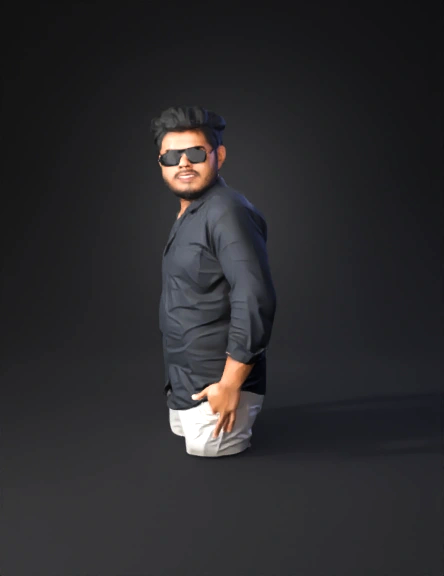
person 3d model
Tags
beard
character
character realistic
character rendering
character rendering realistic
image
man in black shirt
person
photo
realistic
rendering
rendering realistic
Input
Prompt
It looks like you've uploaded a photo of a person this time! To help you create a high-quality 3D character model or digital double, here is a breakdown of the key physical features and proportions from the image. 1. Head and Facial Structure * Face Shape: Heart-shaped or inverted triangle, with a prominent forehead and a jawline softened by a full beard. * Hairstyle: Thick, voluminous black hair styled in a modern, textured quiff. The hair is shorter on the sides and back, with significant height and "flow" toward the top and front. * Facial Hair: A well-groomed, full beard and mustache with a slightly thicker density around the chin (goatee area) and shorter on the cheeks. * Eyewear: Large, square-framed, dark-tinted sunglasses with a thin metal bridge and temples. The frames are flat-top style. 2. Body Type and Pose * Build: Mesomorph/Average build with well-defined shoulders. * Pose: Three-quarter side profile. The left hand is tucked into the front pocket, creating a natural fold in the shirt and a slight "hunch" or relaxed curve in the upper back and shoulders. * Proportions: Normal human proportions; the torso length is roughly balanced with the visible upper thigh area. 3. Clothing Details (For Texturing and Cloth Sim) * Shirt: A black, long-sleeved, button-down shirt. * Fabric: Appears to be a cotton or linen blend with a matte finish. * Details: Cuffed sleeves (pushed up to mid-forearm), a standard point collar, and a visible placket with dark buttons. * Drapery: Significant tension folds around the elbow and where the hand enters the pocket. * Trousers: Cream or off-white colored trousers (likely chinos or denim). They sit at the natural waistline. Technical Modeling Tips * Hair Sculpting: Use "Hair Cards" for the beard to achieve realism, or a "Groom" system (like XGen) for the scalp hair to capture the individual strands and volume. * Skin Shader: The subject has a warm, medium skin tone. Use a Subsurface Scattering (SSS) map to ensure the ears and nose tip react naturally to the bright, outdoor lighting shown in the photo. * Lighting Environment: To match the photo, use an HDRI of an open, overcast, or bright daylight setting to get those soft but defined shadows. Would you like me to focus on a specific part, such as a detailed description of the hair's "flow" or the specific folds in the clothing for a physics simulation?
Detailed Info
Related Models
Enter invite code
Enter invite code to get credits!
 Anonymous1766682893


 Anonymous1766682893