3D Workspace
Home
Assets
Affiliate Program
Sign up/Log in
?
Upgrade
DCC Bridge
Anonymous1768410247
01-15 16:03
Model Name
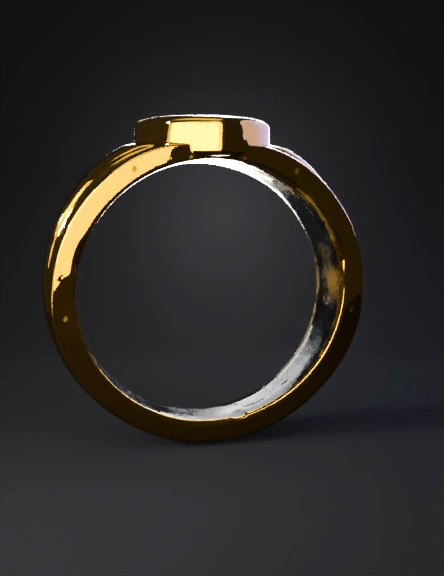
gold heart ring 3d model
Tags
gold heart ring
props
props realistic
props rendering
props rendering realistic
realistic
rendering
rendering realistic
Input
Prompt
Object Description for 3D Modeling Type: Finger ring Style: Minimal, symbolic, polished gold ring Material (visual): High-polish yellow gold (mirror finish) Overall Structure The ring has a medium-width band with a smooth, continuous circular profile. Band thickness is uniform at the bottom and gradually widens toward the top center. Inner surface is smooth and rounded for comfort fit. Outer surface is highly polished, with soft reflections and no visible texture. Top Motif (Center Design) The top centerpiece is a raised heart shape. Heart is: Symmetrical Slightly domed (convex surface) Smooth edges with no sharp corners The heart sits on a slightly elevated base, blending seamlessly into the band. No gemstones, engravings, or cutouts—solid metal heart. Side Details On both sides of the heart, the band features subtle flowing ridges or wave-like contours. These contours: Curve gently backward toward the band Are shallow and smooth, not deeply carved Create a sense of motion leading into the heart centerpiece The transition from band → ridges → heart is organic and continuous, not segmented. Proportions (Approximate) Heart width: ~60–65% of the band’s top width Heart height: Slightly raised (about 1.5–2 mm above band surface) Band width: Bottom: Narrower Top: Gradually flares to support the heart Surface Finish Entire ring is high-gloss polish No matte areas No visible seams or joints Rounded edges throughout for a soft, premium look Modeling Notes (Helpful Tips) Use Subdivision-friendly topology for smooth curves Apply fillets/chamfers to all edges Heart should be modeled as integrated geometry, not a separate glued element Avoid sharp angles—everything is smooth and flowing If you want, I can also: Write exact dimensions for CAD (Rhino / Fusion 360) Provide step-by-step modeling instructions Convert this into a prompt for Blender, ZBrush, or JewelCAD Just tell me what software you’re using.
Detailed Info
Related Models
Enter invite code
Enter invite code to get credits!
 Anonymous1768410247


 Anonymous1768410247