3D Workspace
Home
Assets
Affiliate Program
Creator Program
Sign up/Log in
View Plans
DCC Bridge
joseph.kalouch
01-22 03:38
Model Name
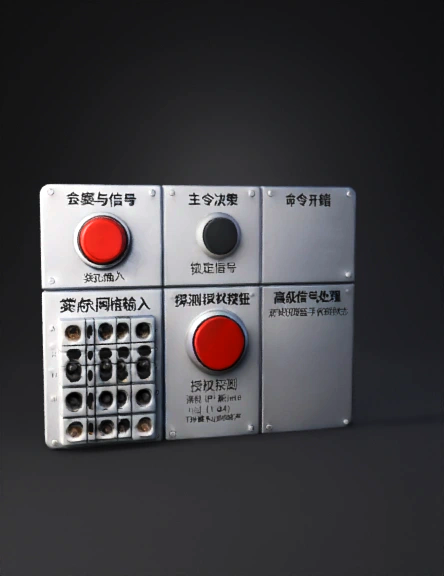
control panel 3d model
Tags
control panel
props
props realistic
props rendering
props rendering realistic
realistic
rendering
rendering realistic
Prompt
OVERALL LAYOUT (Front-Facing) Orientation: Landscape Sections clearly separated by panel seams Left = Intel input Center = Decision & authorization Right = Advanced signal handling (dormant early game) TOP SECTION — SESSION & SIGNAL 1. MASTER POWER SWITCH Type: Heavy toggle States: OFF / ON Visual: Scratched metal Red enamel tip Always present, always functional 2. INTEL CALL LOCK BUTTON Type: Momentary push button Label: “LOCK SIGNAL” Function: Confirms the current Intel Call (1–64) Physical feel: Firm resistance Audible click LEFT SECTION — INTEL GRID INPUT 3. INTEL GRID JACK MATRIX Type: Patch-bay style jack holes Layout: 8×8 grid (A1–H8) Purpose: Routes the locked Intel Call to a grid coordinate Visual: No lights Engraved coordinates Core interaction surface CENTER SECTION — COMMAND DECISION 4. PROBE AUTHORIZATION BUTTON Type: Guarded push button Cover must be lifted to press Label: “AUTHORIZE PROBE” Effect: Spends IP Resolves Intel Grid cell T
Detailed Info
Related Models
Enter invite code
Enter invite code to get credits!
 joseph.kalouch


 joseph.kalouch