3D Workspace
Home
Assets
Affiliate Program
Sign up/Log in
?
Upgrade
DCC Bridge
Anonymous1758628675
09-24 09:18
Model Name
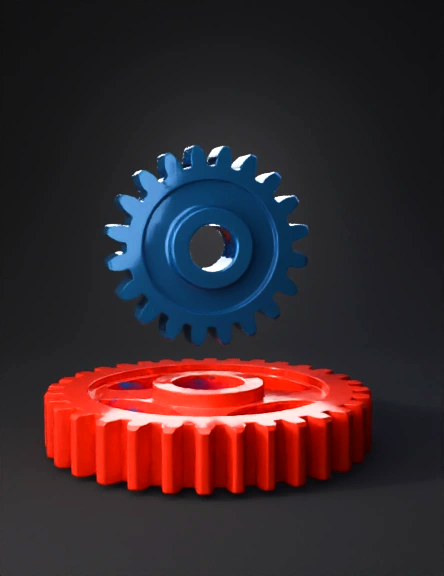
gears 3d model
Tags
gear pair
machine
machine realistic
machine rendering
machine rendering realistic
realistic
rendering
rendering realistic
strap like
tooth shaped
Prompt
// Include the gear library include <involute_gears.scad>; // -------------------------------------------------------------------------- // Define the parameters for the gears // Change these values to create your specific gears // Gear 1 (Pinion) Parameters pinion_teeth = 12; // Number of teeth for the smaller gear pinion_thickness = 10; // Thickness of the pinion // Gear 2 (Gear) Parameters gear_teeth = 24; // Number of teeth for the larger gear gear_thickness = 10; // Thickness of the gear // Common Parameters for both gears module = 2; // Module (determines the size of the teeth) pressure_angle = 20; // Pressure angle in degrees // -------------------------------------------------------------------------- // Calculate the center distance to ensure they mesh correctly // (This is based on the formula: CD = (Teeth1 + Teeth2) * Module / 2) center_distance = (pinion_teeth + gear_teeth) * module / 2; // Create the Pinion (Gear 1) // We use the `gear()` module from the library color("blue") { translate([0, center_distance/2, 0]) { gear( teeth = pinion_teeth, module = module, pressure_angle = pressure_angle, thickness = pinion_thickness ); } } // Create the Gear (Gear 2) color("red") { translate([0, -center_distance/2, 0]) { gear( teeth = gear_teeth, module = module, pressure_angle = pressure_angle, thickness = gear_thickness ); } }
Detailed Info
Related Models
Enter invite code
Enter invite code to get credits!
 Anonymous1758628675


 Anonymous1758628675