3D Workspace
Home
Assets
Affiliate Program
Creator Program
Sign up/Log in
View Plans
DCC Bridge
gulyusufselim4
01-30 07:25
Model Name
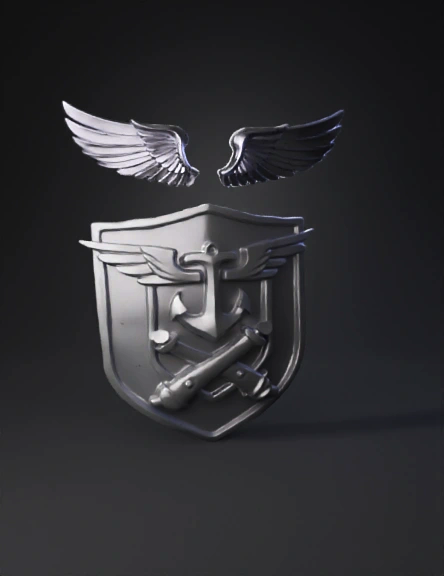
military emblem 3d model
Tags
3d printing
3d printing realistic
abstract symbol
abstract symbol 3d printing
abstract symbol 3d printing realistic
abstract symbol realistic
military emblem
realistic
Input
Prompt
Step 1 – Remove wings: Completely remove the existing wings inside the shield. Do not leave any remnants, cuts, or surface artifacts where the wings were removed. Step 2 – Add new wings: Add a new pair of wings based on the reference Turkish Air Force insignia wings (top image). Positioning rules: – Place the new wings above the anchor – Keep the wings fully inside the shield boundaries – Center them horizontally and align with the vertical axis of the anchor – Do not overlap or intersect the anchor Wing design requirements: – Layered, detailed feather structure – Elegant, aerodynamic military style – Symmetrical left and right wings – Embossed relief style matching the emblem Preservation rules: Do NOT modify the shield shape, anchor, ring, crossed naval shells, or their positions and proportions. Maintain consistent relief depth, surface smoothness, and material across the entire emblem. Output a single-piece, watertight mesh with clean topology, suitable for 3D printing. Use a neutral matte to semi-gloss metallic gray material.
Detailed Info
Related Models
Enter invite code
Enter invite code to get credits!
 gulyusufselim4


 gulyusufselim4