3D Workspace
Home
Assets
Affiliate Program
Sign up/Log in
?
Upgrade
DCC Bridge
Anonymous1769109877
01-27 03:41
Model Name
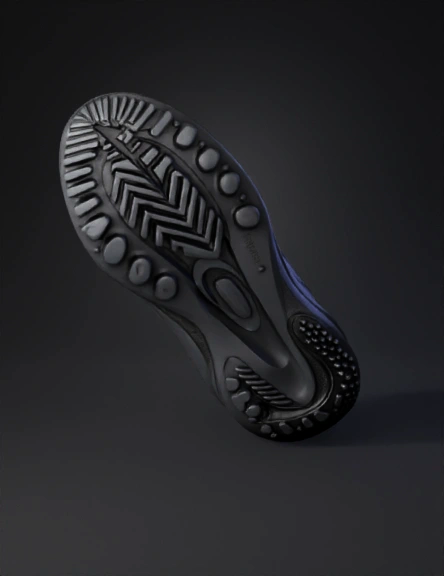
sneaker outsole 3d model
Tags
ergonomic
forefoot
midfoot
props
props realistic
props rendering
props rendering realistic
realistic
rendering
rendering realistic
Prompt
Subject: Technical orthographic and perspective product photography of a high-performance athletic sneaker outsole and midsole unit. Geometry & Structure: > * Anatomy: A decoupled two-piece sole construction connected by a rigid midfoot bridge. Lateral Support: An oversized, ergonomic lateral outrigger wing at the forefoot featuring a gradient of five circular debossed pods and a stippled "sharkskin" micro-texture on the upper rim. Heel Counter: An integrated, high-wrap circular heel stabilizer with a distinct 3K twill carbon fiber weave inlay. Tread Pattern: An aggressive, multi-directional "interlocking link" or "modified herringbone" traction pattern consisting of raised cylindrical nubs connected by narrow ridges. Material Specifications: Midsole: Matte charcoal-black injected Phylon or PEBAX foam with smooth, organic sculptural lines and a deep central drainage/ventilation channel. Outsole: High-abrasion sticky rubber with a semi-matte finish. Structural Insets: Polished TPU midfoot shank with a visible carbon fiber composite texture beneath a glossy protective coat. Technical Style: > * Lighting: Studio softbox lighting, high-key white background, soft ambient occlusion shadows to define the complex undercuts. Perspective: Macro detail shots focusing on the material transitions and the 45-degree lateral profile. Quality: 8k resolution, CAD-rendered aesthetic, sharp focus on textural contrasts between the knurled rubber, woven fiber, and smooth polymer. Tips for 3D Modeling Implementation If you are moving this into a CAD environment (like Rhino, Fusion 360, or Blender), focus on these three layers: The Base Sculpt: Use Sub-D modeling for the main body of the foam. The organic "flow" between the heel and the forefoot is difficult to achieve with traditional boolean operations. The Traction Mesh: Instead of modeling every bump, use a Displacement Map or a Grasshopper script (in Rhino) to populate the "interlocking link" pattern across the bottom UV shell. The Carbon Inlay: This is best handled via a PBR (Physically Based Rendering) material. Use a clear-coat layer over a high-resolution carbon fiber texture map to get that depth seen in
Detailed Info
Related Models
Enter invite code
Enter invite code to get credits!
 Anonymous1769109877


 Anonymous1769109877