3D Workspace
Home
Assets
Affiliate Program
Sign up/Log in
?
Upgrade
DCC Bridge
3D Creation Made Simple
Text & Image to 3D Model in seconds
One-Click Texturing & Smart Detail Editing
Free Credits Monthly
Start Free
Anonymous1744385985
12-25 16:10
Model Name
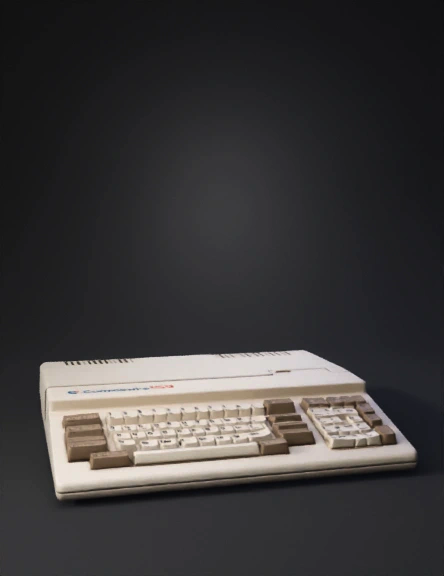
vintage computer 3d model
Tags
machine
rendering
realistic
Prompt
The Commodore 128 (C128) is a vintage personal computer released by Commodore International in 1985, featuring a distinctive rectangular design with a slightly angled front panel. Its case is predominantly made of beige plastic with a smooth matte finish, measuring approximately 16 inches (41 cm) wide, 11 inches (28 cm) deep, and 3 inches (7.6 cm) tall. The overall shape is low-profile and boxy with softly rounded edges, giving it a compact and sturdy appearance. Front Panel: The front panel is gently sloped upwards from the rear to the front edge, improving the ergonomics of the keyboard. The keyboard occupies the majority of the top surface and consists of a full QWERTY layout with 79 keys. The keys are rectangular with slightly concave tops and a beige color matching the case, while the legends are printed in a dark brown or black font. Notably, the keyboard includes a numeric keypad on the right side with smaller square keys. Above the keyboard on the right side, there is a small power LED indicator light. Ports and Connectors: The back panel is vertical and hosts several ports. From left to right: a standard Commodore 8-pin DIN joystick port, two 9-pin joystick ports, a serial IEC port for disk drives and printers, a user port, an RGBI video output (which uses a 6-pin DIN connector), and a power input socket. There’s also a small rectangular reset button near the ports. Branding and Markings: On the top surface, near the front-left corner above the keyboard, the “Commodore 128” logo is printed in a stylized font. The Commodore logo (a “C” with a horizontal line through it) appears alongside the text. The color scheme of the logo is typically a combination of blue and red. Keyboard Details: The function keys (F1 to F4) are grouped above the numeric keypad. The spacebar is long and centered below the letter keys. The keyboard frame has a slight ridge separating it visually from the rest of the case. Additional Features: The cassette port is located on the right side of the unit, covered by a small plastic flap. The unit’s ventilation consists of narrow horizontal slits along the rear edges of the case’s top and bottom sections.
Detailed Info
Related Models
Enter invite code
Enter invite code to get credits!