3D Workspace
Home
Assets
Affiliate Program
Creator Program
Sign up/Log in
View Plans
DCC Bridge
yotamkashtan1
09-20 09:07
Model Name
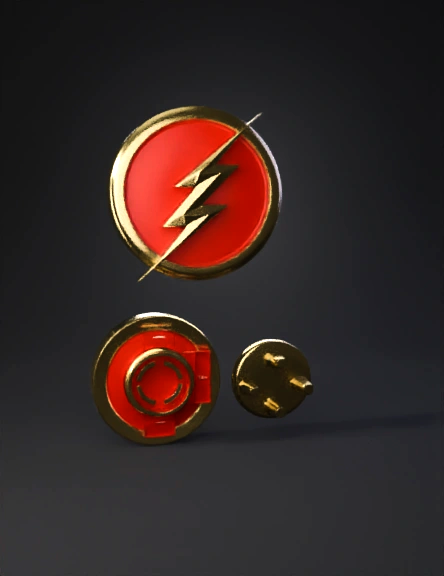
flash emblem 3d model
Tags
3d printing
3d printing realistic
badge
bayonet
props
props 3d printing
props 3d printing realistic
props realistic
realistic
Prompt
Create a highly detailed, 3D printable model of The Flash CW chest emblem with an integrated bayonet twist-lock mechanism. === FRONT EMBLEM === - Circular badge, overall diameter 110 mm, thickness 5 mm. - Raised golden rim: 3 mm thick, 3 mm tall, running around the edge. - Background: flat circular surface inside the rim, recessed by 2 mm, smooth and solid, no holes. - Lightning bolt: raised golden lightning bolt across the center, 6 mm thick, identical to the CW series style. - The front must appear as a solid emblem with background and bolt only. === BACK LOCKING MECHANISM (Integrated Female Bayonet Socket) === - Add a recessed circular bayonet socket at the center back of the emblem. - Outer socket diameter: 70 mm. - Inner cavity diameter: 60 mm. - Cavity depth: 3 mm. - Include 3 evenly spaced L-shaped locking slots at 120° around the socket wall. - Each slot: 3 mm wide, 2 mm deep. - Slots extend inward then curve 90° clockwise to form the locking path. - Add stop walls at the ends of the slots. - Leave 0.3 mm clearance for FDM printing tolerances. === MALE CONNECTOR (Separate Part) === - Circular disc, 58 mm diameter, 3 mm thick. - Top surface has 3 cylindrical locking keys, each 3 mm wide and 2 mm tall. - Keys are positioned at 120° intervals near the disc edge. - Keys fit into the L-shaped slots in the emblem’s back and lock with a quarter turn (90°). === OUTPUT REQUIREMENTS === - Provide two watertight STL files: 1. Complete Flash emblem with smooth solid front and integrated female bayonet socket on the back. 2. Male connector disc with 3 locking keys. - Geometry must be clean, manifold, and fully solid with no holes in the emblem front. - Ensure both parts are optimized for FDM 3D printing with flat build surfaces and no supports required. === FUNCTIONAL BEHAVIOR === - Insert the male connector into the emblem’s back socket. - Twist 90° clockwise: the keys travel along the L-slots and lock under the stop walls. - To remove: twist 90° counterclockwise and pull out.
Detailed Info
Related Models
Enter invite code
Enter invite code to get credits!
 yotamkashtan1


 yotamkashtan1