3D Workspace
Home
Assets
Affiliate Program
Sign up/Log in
?
Upgrade
DCC Bridge
Anonymous201
02-19 05:33
Model Name
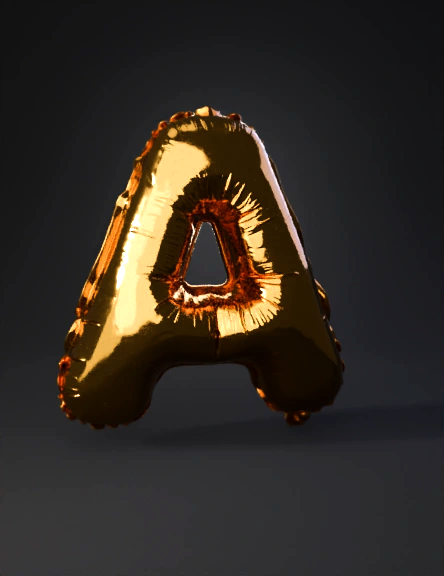
gold inflatable letter 3d model
Tags
props
rendering
realistic
Prompt
Type: Balloon / inflatable style letters Material appearance: Polished metallic gold Surface: Smooth, glossy, highly reflective Finish: Mirror-like with soft light reflections Edges: Fully rounded (no sharp corners) Thickness: Deep extrusion, consistent front-to-back depth Geometry Characteristics 1. Shape Profile Letters are thick and inflated, like helium foil balloons. All edges are filleted/rounded heavily. Front and back faces are slightly convex (bulging outward). Side walls are curved — not flat extrusion. 2. Individual Letter Notes A Rounded triangular outer shape. No sharp apex — top peak is soft and curved. Inner counter (hole) is a rounded triangle/teardrop shape. Crossbar blends smoothly into the body. Slight inward curvature near the inner hole. B Vertical stem is thick and rounded. Two bulbous lobes (upper and lower), both very rounded. Inner holes are oval-shaped and inflated inward. Seam-like indentation effect around inner edges (subtle depth transition). E Vertical spine thick and rounded. Three horizontal arms: Top and bottom slightly longer than the middle. All arms rounded at tips. Inner corners are soft and inflated. Looks slightly softer and more blobby than a standard typeface. Proportions Height greater than width (standard uppercase proportions). Depth (extrusion thickness) approx. 25–35% of letter height. Stroke thickness is heavy and consistent throughout. Surface & Material Properties (for rendering) If using Blender, Maya, Cinema4D, etc.: Base Color: Rich metallic gold (#D4AF37 range) Metallic: 1.0 Roughness: 0.1–0.2 (fairly glossy) Specular: High Clearcoat: Optional slight clearcoat for extra shine Add subtle environment reflections for realism. Modeling Tips Method 1: Beveled Text Start with a bold rounded font. Convert text to mesh. Add: Subdivision Surface modifier (2–3 levels). Bevel modifier (large radius). Slightly scale faces along normals to create bulge. Method 2: Inflate Effect Use sculpt mode with: Inflate brush Smooth brush Or use a cloth/surface pressure simulation for a balloon effect. Optional Extra Detail To make it even more realistic like a foil balloon: Add a very subtle seam line around edges. Slight surface micro waviness. Tiny asymmetry (perfect symmetry can look artificial).
Detailed Info
Related Models
Enter invite code
Enter invite code to get credits!